What Happens to Competitor Prices After Cyber Monday
After Cyber Monday a rival's price snaps back, holds a sale, eases off or rises above its old level. How to tell which from public data, and what it means.
Thomas Pham · · 8 min read
After Cyber Monday, a competitor's price does one of four things. It snaps back to the price it had before Black Friday, it keeps the sale running, it holds a smaller discount into December, or it settles above where it started. You can tell which from the product's own public data, but only if you have a reading from before the sale.
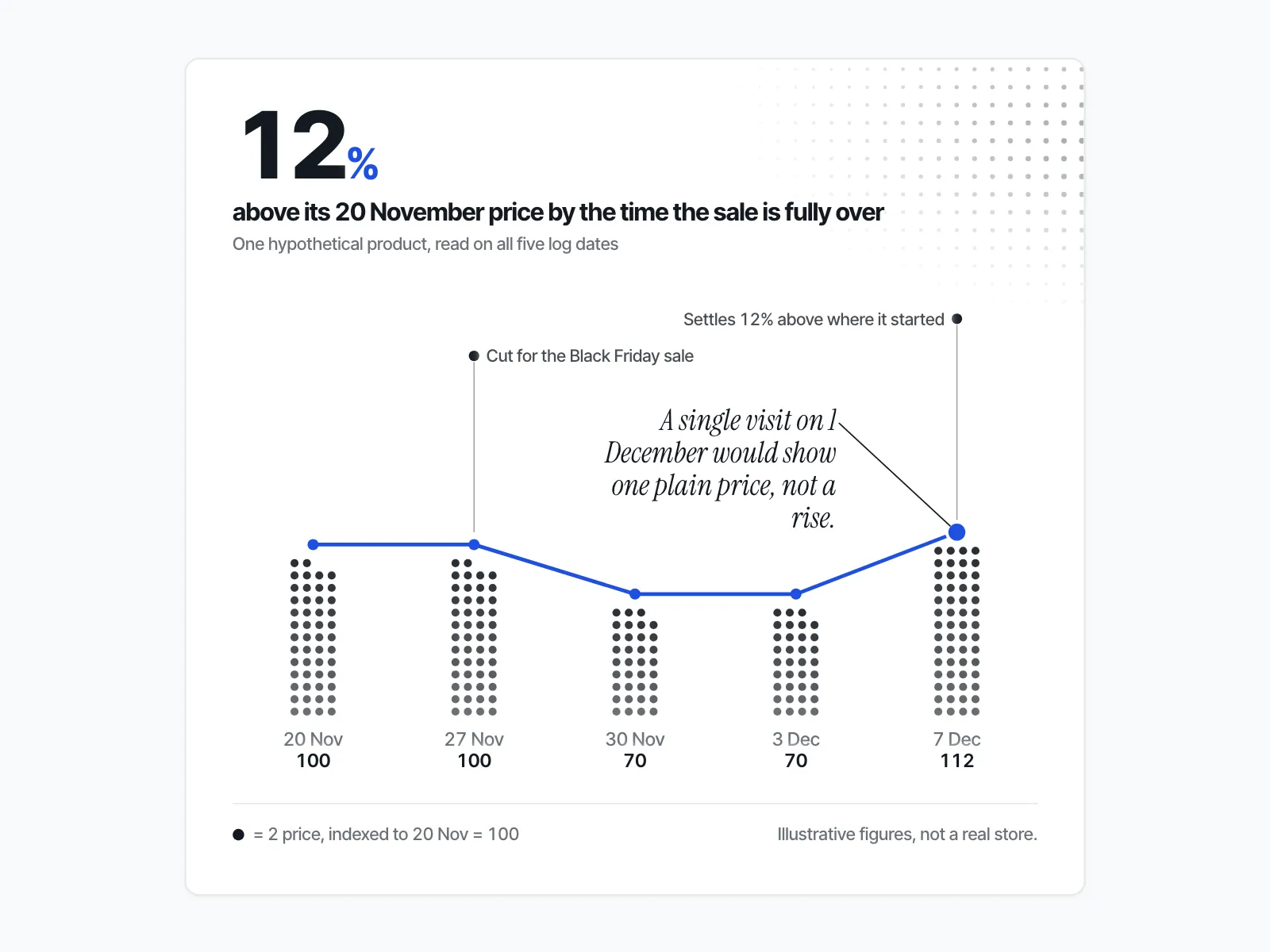
That last condition is the whole problem. Say you sell ceramic cookware, and your closest rival put its best-selling pan set on a deep Black Friday discount. On 1 December the sale banner is gone and the pan set shows one plain price. Is that the old price, a quiet increase, or a December offer with the strike-through removed? From one visit you can't say. With a log from before and after the sale, you can.
Do competitor prices go back up after Cyber Monday?
Competitor prices after Cyber Monday don't all go back up: some do, some stay down, and some go up past where they started. A single visit on 1 December can't tell you which, because "back up" means against the price before Black Friday. You need at least two readings of the same product; five are better.
The calendar for 2026 is short. Thanksgiving is fixed in US law as "the fourth Thursday in November" (5 U.S.C. § 6103), which puts it on 26 November. Black Friday is 27 November and Cyber Monday is 30 November. The "after" window starts on Tuesday 1 December.
Adobe's 2026 forecast says the market as a whole won't drop discounts to zero on 1 December. The forecast, published in September, expects discounts "up to 30% off listed price (during Cyber Week)" and "up to 10-15% throughout December" (Adobe, 28 September 2026). It is a forecast for the whole US market: it tells you what is normal, not what your rival did.
What are the four things a rival's price can do after the sale?
The four patterns are snap-back, extended sale, soft hold and quiet raise. Each one leaves a different trace in two public fields every Shopify product carries, price and compare_at_price, plus one signal from outside the store: whether the sale's ad is still active.
| Pattern | Price vs. before Black Friday | Compare-at price | Sale ad |
|---|---|---|---|
| Snap-back | Back to the same number | Cleared | Inactive |
| Extended sale | Still at the sale price | Still set | Still active, often with new "last chance" wording |
| Soft hold | Below the old price, above the sale price | Usually still set, with a smaller gap | Either |
| Quiet raise | Above the old price | Cleared, or set even higher | Inactive |
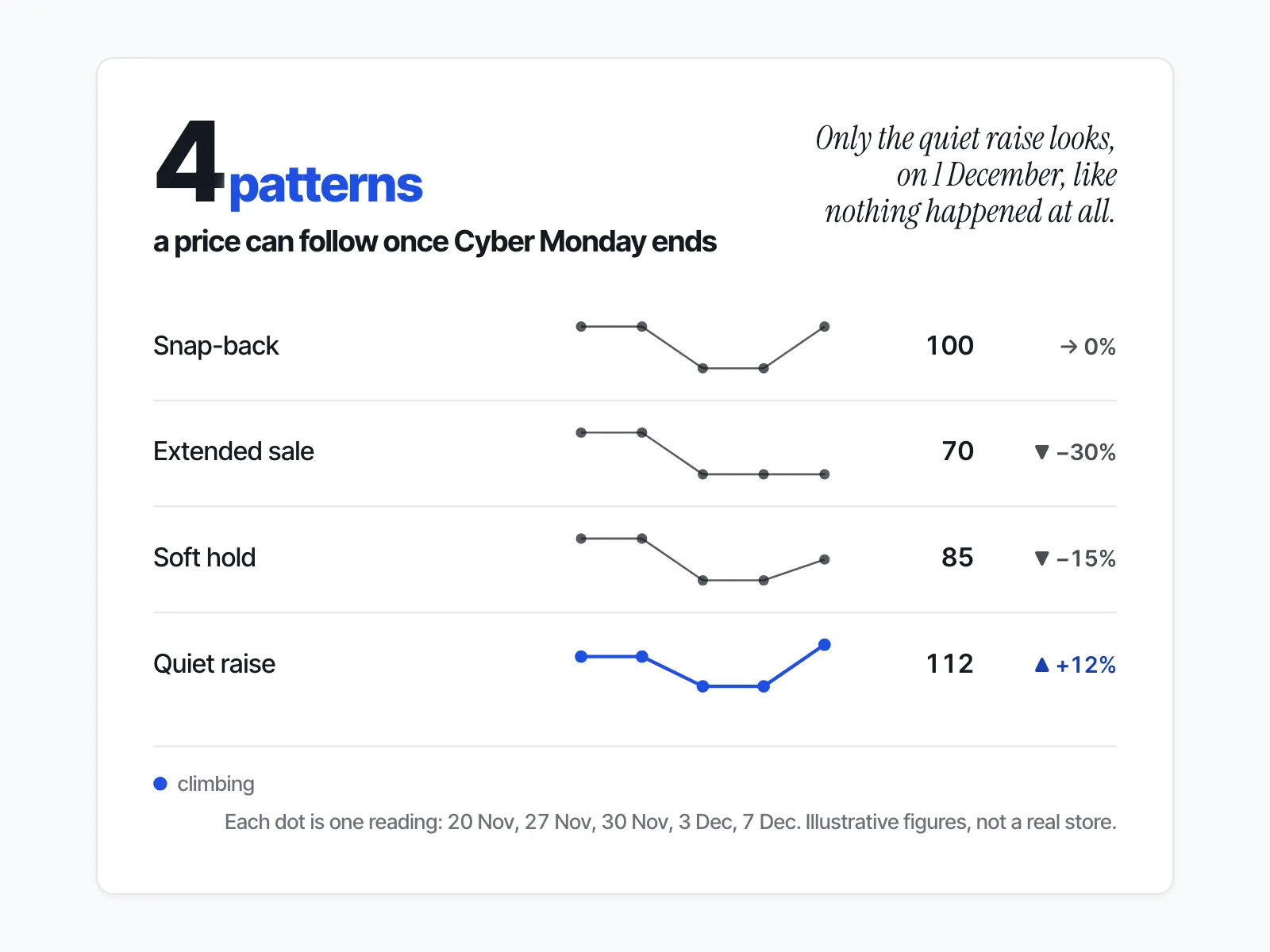
Snap-back is the clean end of a sale. The price returns to the number it had before Black Friday, and the compare-at field is emptied. On Shopify, the compare-at price is what draws the strike-through: Shopify tells merchants to set it "to the original price of the product" and to make sure it "is higher than the value in the Price field" (Shopify Help Center, sales). Once it is cleared, the markdown disappears from the page.
Extended sale means nothing changed on 1 December. The sale price and the compare-at are both still there, and the ad is still running.
Soft hold is a smaller discount that carries on into December. The price climbs part of the way back, and the compare-at usually stays, so the strike-through shows a smaller gap.
Quiet raise is the one merchants miss. The sale ends, and the new regular price sits above the price before Black Friday. On the page it looks like a normal, undiscounted product. Only a reading from before the sale shows the rise.
How do you build a five-point price log?
Read the same product on five dates: 20 November (a week before Black Friday), 27 November (Black Friday), 30 November (Cyber Monday), 3 December and 7 December. Each time, write down the price, the compare-at price and whether the sale ad is still active.
Shopify documents a public endpoint that returns one product as JSON: GET /{locale}/products/{product-handle}.js (Shopify Ajax API, product). Shopify states that the Ajax API "is an unauthenticated API. It doesn't require access tokens or a client ID to access" (Ajax API overview). Each variant in the answer has its price and its compare_at_price. A variant with no compare-at comes back as "compare_at_price": null.
The routine:
- Pick the hero products you would actually consider matching, not the whole catalogue.
- Request the product's JSON at
/products/{product-handle}.json the rival's store. - On each of the five dates, copy the price and compare-at price of the variant you sell against into a spreadsheet, with the date.
- On the same dates, check the rival's sale ads in Meta's Ad Library and note whether each one is active or inactive.
- On 7 December, compare the last row against the first. That comparison names the pattern.
Five points catch what a before-and-after pair misses: a price that snaps back on 1 December and creeps up by 7 December, or a compare-at that comes back a few days after the sale ends.
If you have no reading from before Black Friday, the honest answer for that product is "unknown". Start the log on the day you read this, and next year you will have the "before".
Why check the compare-at price and not just the price?
The compare-at price is the field a rival uses to claim a discount. A price that went down while the compare-at stayed up is a markdown. A price that went up past its pre-Black-Friday level while the compare-at was cleared is a quiet raise; one that only returns to that level with the compare-at cleared is a snap-back.
The quiet raise matters beyond December. The US Federal Trade Commission (FTC) says a former price is a fair basis for a comparison only "if the former price is the actual, bona fide price at which the article was offered to the public on a regular basis for a reasonably substantial period of time" (16 CFR 233.1). When the "was" price is inflated, the guide says "the 'bargain' being advertised is a false one." The checks for a "was" price are in how to tell if a competitor's Black Friday "was" price is real.
Google draws the same line between a short deal and a long one. Its experimental Deal Ends annotation requires that "the deal must be scheduled to expire within 7 days" and that "the price must be the lowest effective price for that item in the last 60 days" (Google Merchant Center Help). A sale still running a week after Cyber Monday with no end date is not that kind of deal, and only your log shows how long it has really run.
Does a sale ad going inactive tell you the same thing?
Not on its own: an inactive sale ad tells you the rival stopped paying to promote the sale, not that the price changed. Read the ad status next to the price: an inactive ad with the sale price still live often points to a soft hold or an extended sale left quietly in place.
Meta's Ad Library shows each ad as active or inactive. Meta's own page says ads about social issues, elections or politics "are visible whether they're active or inactive and are stored in the Ad Library for 7 years", and that ads delivered in the EU are "archived for one year upon the delivery of their last impression" (Meta Ad Library tools). Meta's page does not state how long an ordinary commercial ad stays findable once inactive outside the EU. So record what you see on each date.
A new "last chance" or "extended" ad that starts after 30 November is the clearest sign of an extended sale. For how rivals change offers between the two big days, see what competitors change from Black Friday to Cyber Monday.
How do you track this without checking five dates by hand?
ecvision, a competitor-tracking app for Shopify brands, keeps a dated price and ad log for the products and ads you track. The Products screen draws a "Price over time" chart with two lines, Price and Compare-at, and marks each change as "from → to" at the date it was first seen.
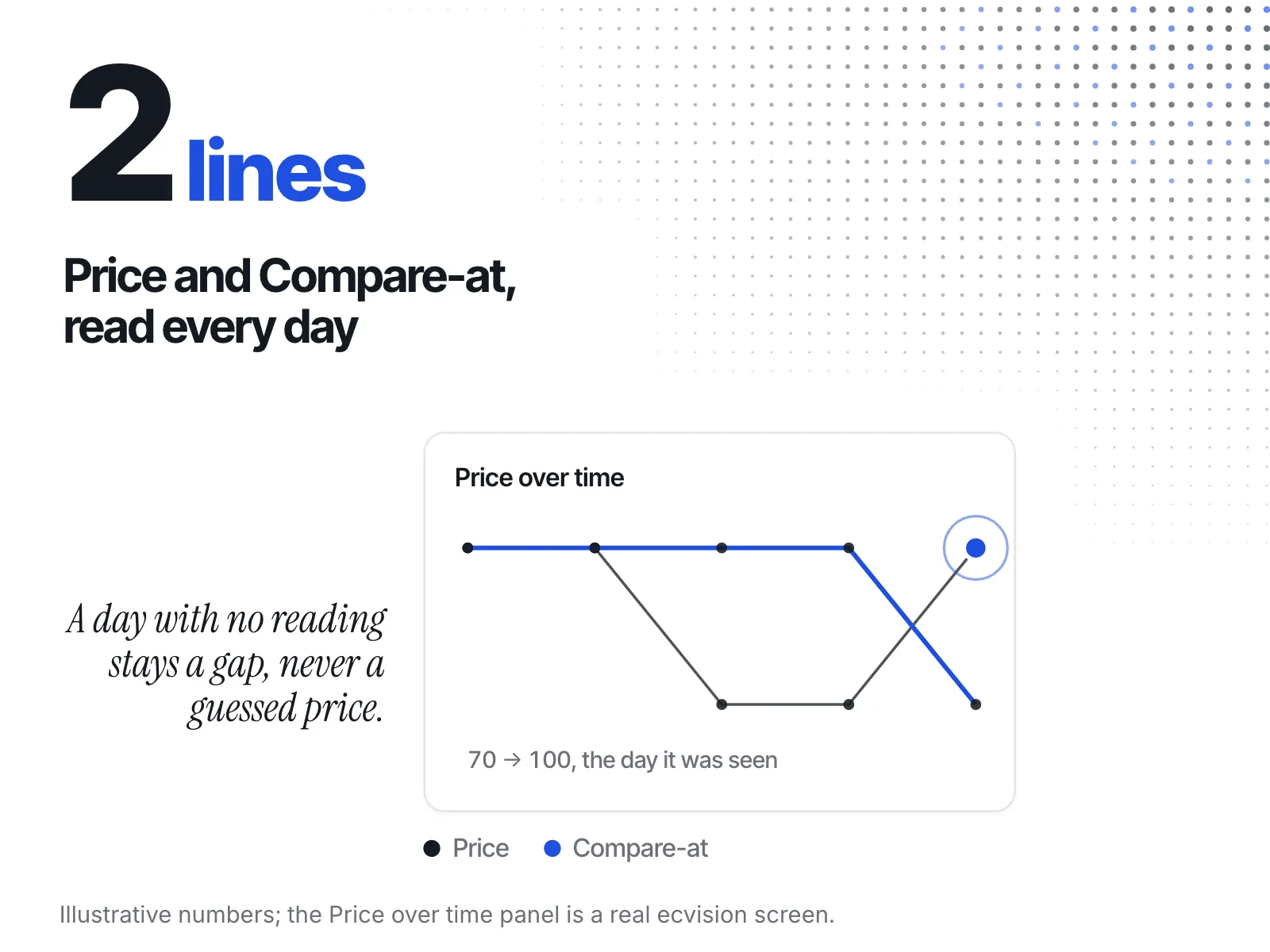
A day with no reading is kept as a gap, not a price, so a missed check never shows up as a snap-back that did not happen.
On the Ads screen, each tracked ad carries a badge that reads "Running" or "Ended". Its "Running for" tile shows how many days the ad has run and the date that figure was read. When the true start of an ad is not certain, the tile shows the count as a floor ("at least") rather than a guess. Read the two together and you can name the pattern yourself. For the alert side of this, see the guide to setting up competitor price alerts on Shopify. Plans are on the pricing page.
What does each pattern mean for your December and January prices?
Each pattern asks a different question of you. A snap-back means the rival treated the sale as a sale. An extended sale or soft hold means the discount is still your competition. A quiet raise means you may now be the cheaper option without changing anything.
- Snap-back. The rival is back where it was. If you matched for Black Friday, you can return to your own regular price.
- Extended sale. The discount is still live against you. Decide on margin, not on panic. The steps are in what to do when a competitor cuts prices on Shopify.
- Soft hold. This is what Adobe forecasts for the market in December. A smaller December offer of your own is a normal response, not a price war.
- Quiet raise. You may now be the cheaper store at your old price. Say so in your product copy and ads before raising your own price. Keep the rival's dated readings: if their new, higher price shows up struck through in January, you will know where it came from.
One market figure shows why the quiet raise is worth watching. Salesforce reports that across the 2025 holiday season (1 November to 31 December), "the average selling price (ASP) increased 7% YOY both worldwide and in the U.S." (Salesforce, January 2026). It is a season-wide average, not proof of what any one rival did, but a reason to check your rival's December price rather than assume it is lower. More of the season's numbers are in the Shopify BFCM statistics for 2026.
The post-Cyber Monday price check, in short
- Log the hero products you compete on: 20 November, 27 November, 30 November, 3 December, 7 December.
- Each time, record price, compare-at price and whether the sale ad is active.
- Compare 7 December against 20 November to name the pattern: snap-back, extended sale, soft hold or quiet raise.
- With no "before" reading, the answer is "unknown". Start the log now.
- Keep the readings. They are your evidence when the same product goes on sale again.