How to Set Up Competitor Price Alerts on Shopify
Set up competitor price alerts before Black Friday week: the free Shopify feed method, what Prisync and PriceKit check and cost, and what alerts miss.
Thomas Pham · · 8 min read

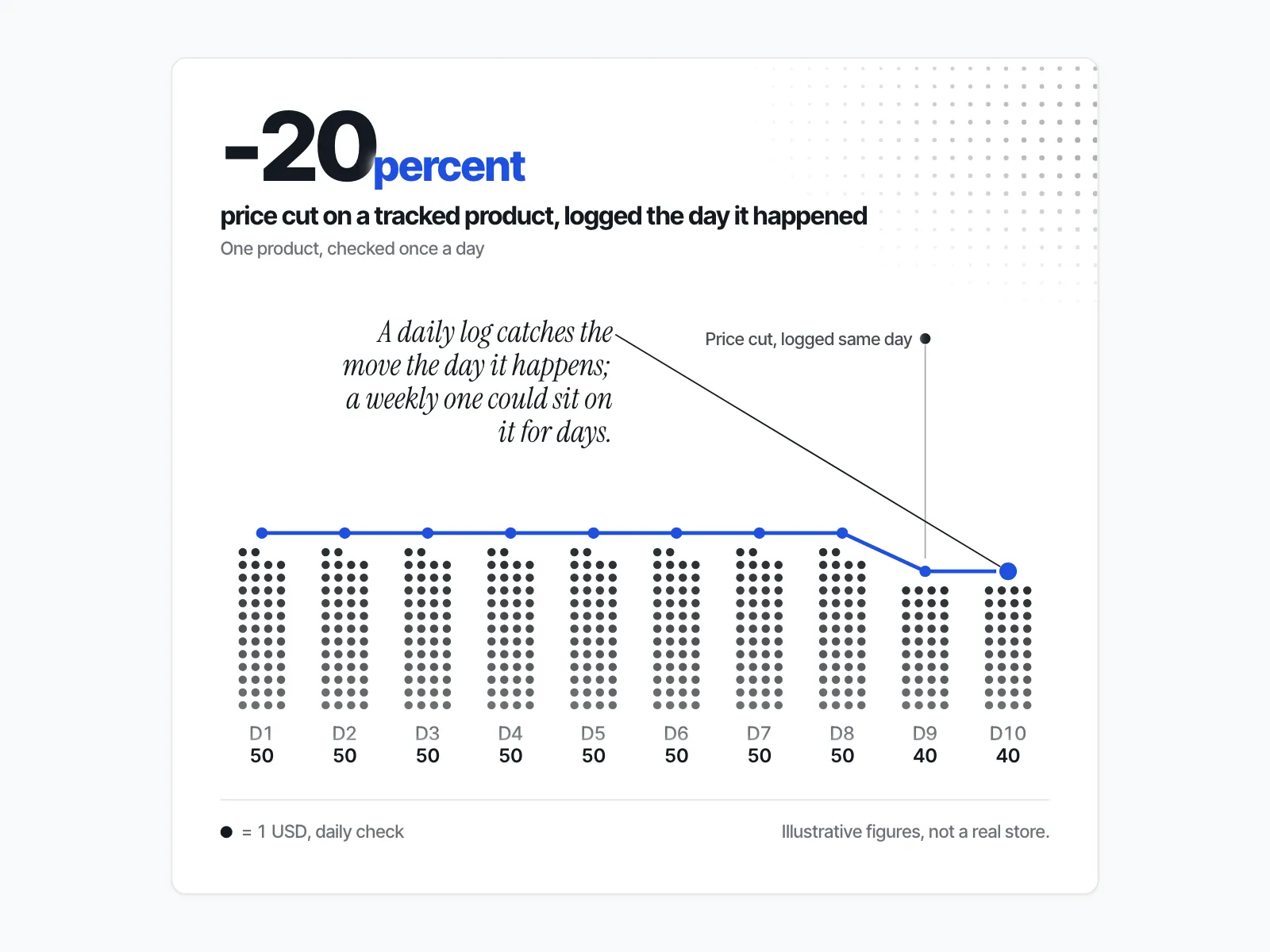
If you only look at a rival's store when you remember to, you learn about their price cut after it has been running for a while, often from a customer or a quiet sales day. To set up competitor price alerts on a Shopify store, pick the rival products that matter, read their public price feed on a schedule (by hand or with an app), and decide in advance who acts when a price moves.
What's the free way to watch a competitor's Shopify prices?
A Shopify store's product prices are public data. Add .js to a rival's product address, or open /products.json on their domain, and you get each variant's price and compare_at_price, with no login. Check it on a schedule, log what you see, and you have a basic price alert for free.
Here is what that looks like on a real store. On 29 October 2026 we requested the first product in Allbirds' public feed: https://www.allbirds.com/products.json?limit=1. It returned the product "womens-allbirds-flip-flop-dusty-pink" with 7 variants. Each variant carried "price": "50.00" and "compare_at_price": null.
Those two fields are the whole game:
priceis the variant's selling price.compare_at_priceis the "was" price. Shopify's sale pricing guide tells merchants to set the Compare-at price field "to the original price of the product". When it isnull, there is no was-price on that variant.
Shopify documents the single-product version in its Ajax API reference: GET /{locale}/products/{product-handle}.js. The same page notes that "All monetary properties are returned in the customer's presentment currency", so check the feed from the same country each time, or you may end up comparing two currencies.
How do you find which rival products to check?
You need each product's handle, the last part of its URL. Shopify's Help Center says "All Shopify stores automatically generate a sitemap.xml file that contains links to all your products". Open /sitemap.xml on the rival's domain, follow the products sitemap, and copy the handles you care about.
How do you turn the feed into an alert?
You have two no-code options:
- A sheet. Paste each product URL into a column. Once a day, open each
.jsonlink and copy the price and compare-at price into a dated row. A change between rows is your alert. - A page-change watcher. Point one at the
.jsonaddress of each product and let it email you when the text changes.
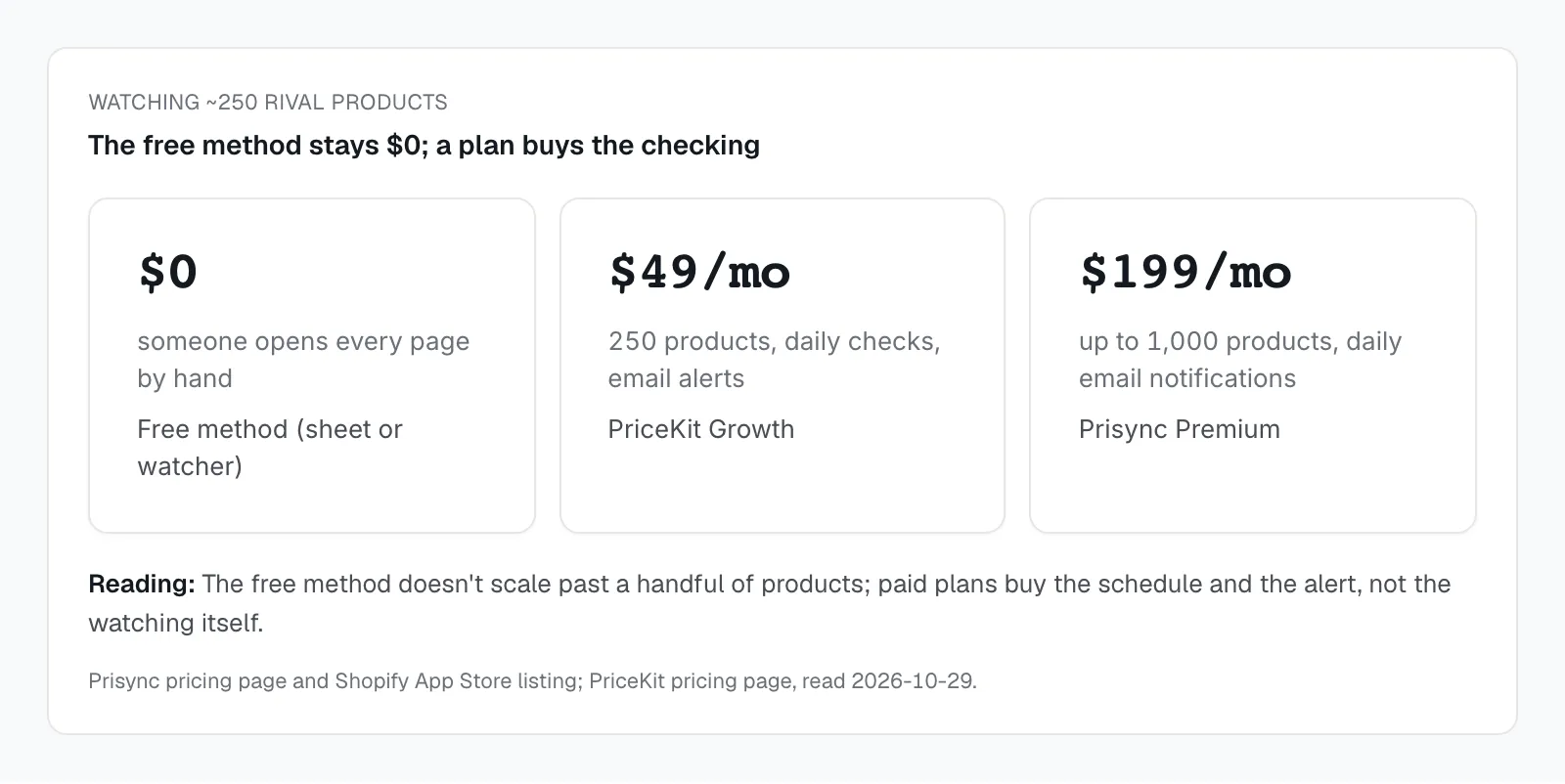
The free method has real limits. There is no history unless you keep it, no alert unless you build one, and every product is one more thing to check. It works well for five products. It gets painful at fifty.
What do Prisync and PriceKit alert on, and what do they cost?
As of 29 October 2026, PriceKit runs from $0 to $249 a month and Prisync from $99 to $399 a month on its own site ($49 for Professional on its Shopify App Store listing). Both check competitor product pages on a schedule and tell you when a price changes. Check frequency and email alerts depend on the plan, so read the plan line, not the headline.
Prisync
Prisync's pricing page says you "add competitor URLs one by one or simply in bulk per product." Its URL Based plans, as of 29 October 2026:
| Plan | Price per month | Products | What it says about checks and alerts |
|---|---|---|---|
| Professional | $99 | up to 100 | "Unlimited Competitors!", "Price Updates 3 Times a Day" |
| Premium | $199 | up to 1,000 | "Daily E-mail Notifications" |
| Platinum | $399 | up to 5,000 | email notifications as soon as a price changes |
It also sells Channel Based plans at $199, $399 and $599 a month, where "Prices are Updated Daily". The trial line reads: "14 days for free. No credit cards or contracts needed." API access costs "an extra 20% on top of the monthly fee."
Prisync's Shopify App Store listing, "Prisync AI | Dynamic Pricing", shows Professional at "$49 / month" with "Price and Stock Updates 3x Day", Premium at "$199 / month" with "Daily Price Change Notifications", and Platinum at "$399 / month" with price change notifications sent as soon as a price moves. The two pages quote different prices for Professional, so confirm the price on the page you sign up through.
Who it fits: a store that wants to track many competitors per product and is ready to pay for email alerts. If you want an email the moment a price moves, the plan that says so is Platinum.
PriceKit
PriceKit's pricing page lists four plans, as of 29 October 2026, and says "Every paid plan comes with a 7-day free trial."
| Plan | Price per month | Products | Competitor URLs | Checks | Alerts |
|---|---|---|---|---|---|
| Free | $0 | 5 | 2 per product | "Daily price checks" | "In-app notifications" |
| Starter | $19 | 50 | 5 per product | "Daily price checks" | "Email & in-app alerts" |
| Growth | $49 | 250 | 10 per product | not stated on the pricing page; "1x per day price updates" on the App Store listing | "Email & in-app alerts" |
| Business | $249 | 1,000 | Unlimited | "2× daily price checks" | no alert line on the plan; "In-app notifications" is listed under "Every plan includes" |
Its Shopify App Store listing, "PriceKit: Smart Price Tracking", adds a detail the pricing page leaves out: on top of the scheduled checks, Starter includes 5 on-the-spot price checks a day, Growth 25 and Business 100. Free, Starter and Growth list "1x per day price updates"; Business lists "2x per day price updates". Yearly billing "equals 10 months — 2 months free."
Who it fits: a founder who wants to try alerts on a few hero products before paying anything. The Free plan covers 5 products; email alerts start at Starter.
For a wider list of tools, see our roundup of competitor price monitoring apps for Shopify stores.
What will a price alert miss?
A price alert watches one or two numbers on the product page. A rival can run a real Black Friday offer without moving either: a checkout code, an automatic cart discount, a bundle, a free gift. A sold-out product also keeps its price.
Discount codes. Shopify's discount codes page says: "Customers enter a specific code at checkout to receive a discount." The product page price does not change, so neither does the feed. Watch the rival's email list and homepage banner for the code.
Automatic discounts. Shopify's automatic discounts page says these are "automatically applied in the cart and at checkout when eligibility conditions are met." The help page does not say the product page price changes, so treat an automatic discount as invisible to a price feed until you see the cart.
Bundles and gifts with purchase. "Buy two, get a third free" or a free tote over a spend threshold adds value without a line-item price move. The alert stays quiet.
Stock-outs. In the Allbirds feed above, the first two sizes showed "available": false and still showed "price": "50.00". A price alert on a sold-out variant will never fire, and it will never tell you the rival ran out. If stock matters to you, log the available field next to the price.
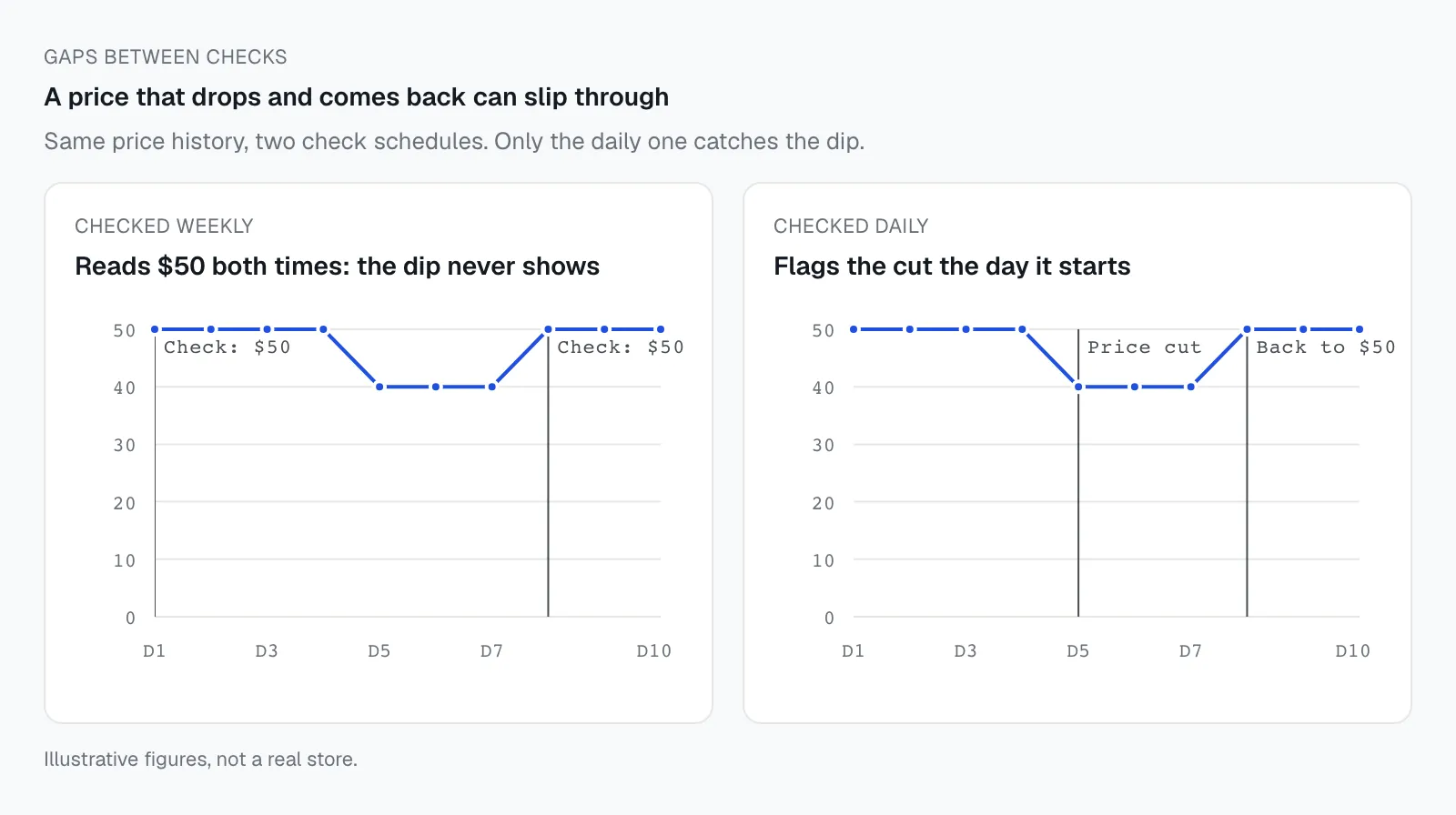
Gaps between checks. A tool that checks once or three times a day can miss a price that drops and comes back between two reads.
Compare-at games. An alert tells you the was-price moved, not whether it was ever real. That question needs its own check: here is how to tell whether a competitor's Black Friday was-price is real.
How does ecvision fit, if you watch more than a few products?
ecvision is a competitor-intelligence app for Shopify brands that reads a rival's whole public catalogue once you add its domain. Both methods above are set up one product URL at a time. In ecvision you add the rival once, by its domain, under "Add a competitor". From then on it reads "Titles, prices, compare-at prices, sizes in stock and shelf places, as each shop's own catalogue and collection pages list them." Products are read on each store's collection run, so this is a scheduled read, like the tools above, not a live feed.
In the product list, a product whose price has not moved shows the label "Steady". A product whose price or compare-at price has moved shows a small price line instead. Open the product and the "Price over time" panel draws the price, with the compare-at price where there is one. A separate "Sizes in stock over time" panel marks each "Sold out" day and each "Back in stock" day, which covers the stock gap a price alert leaves open. If you only care about two products, the free method is enough. You can see what ecvision tracks on a rival store before deciding.
When should your alerts be running?
Before the rival's early-access window opens, not on Black Friday morning. A first reading gives you the normal price to compare against. Without it, a sale-week reading has nothing to be measured against.
Say you sell merino socks and your closest rival sells a three-pack you compete with head to head. If your first check of their three-pack happens on the Friday, you see one price and no context. Is it a cut? Was the compare-at there last month? If you started logging two weeks earlier, the alert tells you the day it moved, and your first log tells you what "normal" looked like.
Our guide on how to see when competitors start their Black Friday sale covers the signals that show a sale is coming before the price moves.
What should a pre-Black Friday price alert checklist include?
A short list you can finish in an afternoon: the products, the threshold, the owner, the start date. The checklist below is the setup, not the response. What to do once an alert fires is a separate decision, covered in what to do when a competitor cuts prices on Shopify.
- Pick the rival products. Their hero products, the ones that sit beside yours in a search, and anything they discounted hard last year.
- Log a first reading now. Price, compare-at price and
availablefor each variant you care about. - Choose your method. The free sheet or watcher for a handful of products; an app when the list outgrows an afternoon.
- Set the threshold. Decide which move you would act on, for example a price change of 5% or more, or a compare-at price appearing where there was none.
- Check the frequency. Know how often your method reads the price, and accept that anything faster than that will slip through.
- Name the reader. One person reads the alerts during sale week and knows what they are allowed to change.
- Cover the gaps. Sign up to each rival's email list and check their homepage banner for codes, bundles and gifts the feed cannot see.