How to See Competitor Black Friday Emails (+ Log Template)
Set up a spare inbox, opt in to each rival's emails and texts, and log seven things per send before Black Friday on 27 Nov 2026. Plus Milled and MailCharts.
Thomas Pham · · 8 min read
To see a competitor's Black Friday emails, sign up to their list yourself, with a spare inbox used only for rivals, and opt in to their texts where they offer it. Then log every send in one table. For past campaigns, search a public email archive such as Milled.
Black Friday 2026 is Friday 27 November and Cyber Monday is Monday 30 November (5 U.S.C. § 6103 fixes Thanksgiving as "the fourth Thursday in November"). Many rivals tell their subscribers about the sale first. If you are not on the list, you may hear about it last.
Why watch a rival's emails, not just their site?
A rival's email list often hears about the sale first. Early access, the real start time, a code or a "last chance" push can reach subscribers before the homepage changes, though some send nothing until the sale is live. Those emails tell you when they start, how deep they go and how hard they push, in time to adjust.
The site shows the offer once it is live. The inbox shows the lead-up: teaser, VIP window, reminder, extension.
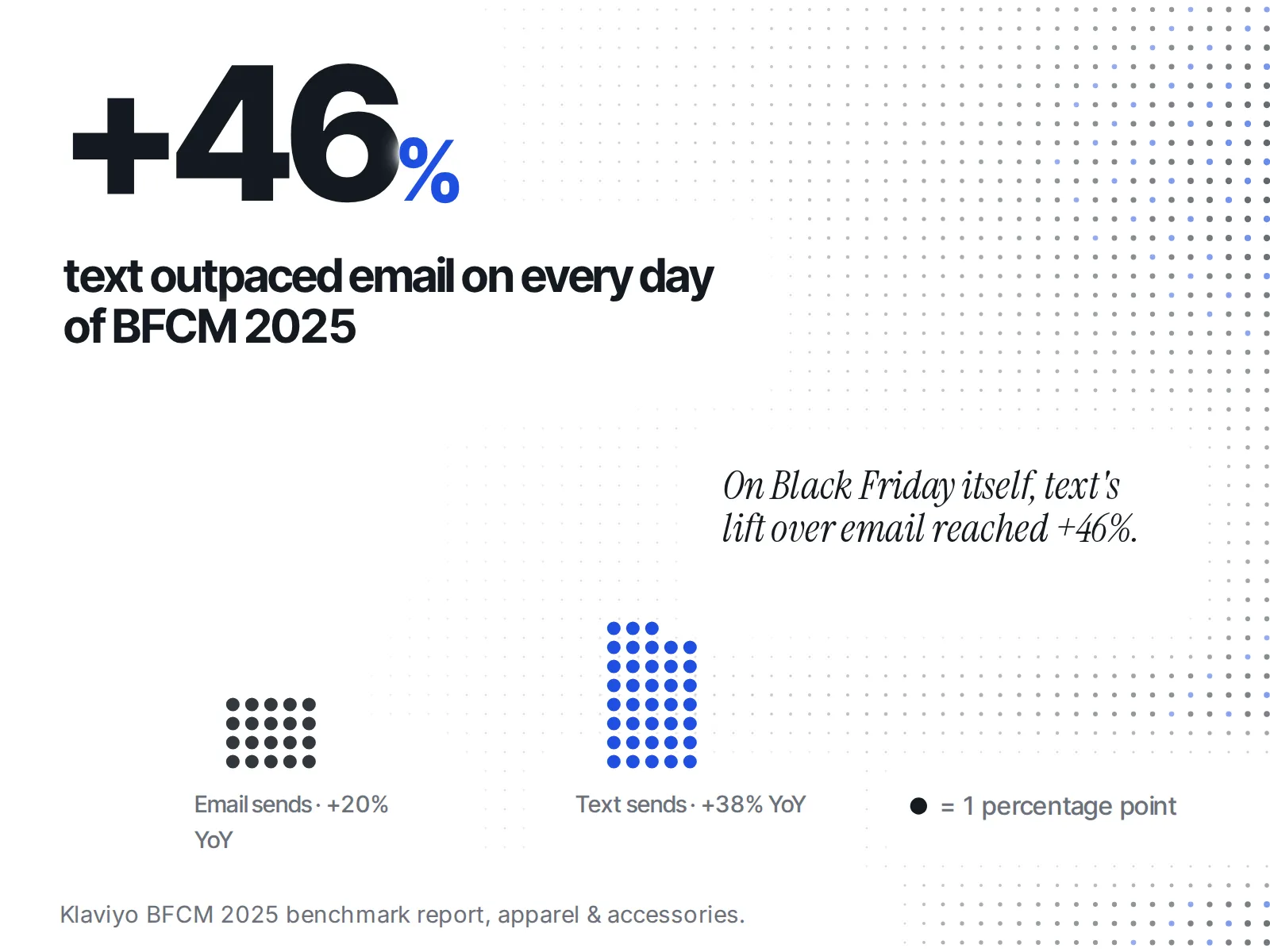
Texts matter too. In Klaviyo's BFCM 2025 benchmark report, for apparel and accessories brands, "text outpaced email on all 5 days, peaking at +46% on Black Friday." If a rival in your category offers SMS sign-up and you skip it, you miss every text they send.
Early access is one of several signals that a sale is about to open. The others, and how to read them together, are in how to see when competitors start their Black Friday sale.
How do I get on a rival's list without cluttering my own inbox?
Make one email address just for competitor sign-ups, and a phone number you are happy to give out. Then join each rival's list the way a customer would: the newsletter form in their footer or pop-up, and their SMS sign-up if they have one. Sign up by 20 November 2026, a week before Black Friday, so the early-access emails land.
The setup takes one sitting:
- Create a spare inbox. A new email account with a plain name. Keep it separate from your work email, so rivals' sends never mix with your customers' replies.
- Pick your rivals. Five is plenty for one person to read. If you have not chosen them yet, build a competitor watchlist first, then come back.
- Sign up on each rival's site. On a Shopify store, the newsletter form is how a shopper opts in. Shopify's theme docs on email consent say that "Customers can consent to email marketing through the theme using a newsletter sign-up form." That is the same form you use.
- Opt in to texts where offered. If a rival's site offers SMS sign-up, take it, with the spare number.
- Make a label or folder per rival. Filter each sender into its own folder, so a week of sends reads in order.
- Write down the sign-up date. If a rival has a welcome series, it arrives first. Knowing when you joined tells you which emails are the welcome flow and which are the Black Friday campaign.
Signing up through a public form is exactly what any shopper does. You are reading what the brand chose to send to its list. If you would rather not stay on after Cyber Monday, unsubscribe: under the FTC's CAN-SPAM compliance guide, a sender "must honor a recipient's opt-out request within 10 business days." For the wider question of what you can and can't look at, see what public data you can legally see about a Shopify store.
What should I log from each email?
Log seven things per send: the channel, the date and time it arrived, the subject line, the discount depth, any early-access or VIP gate, the urgency copy, and the code. Seven fields show each rival's sequence at a glance and are few enough to keep up through Cyber Monday.
Here is the log, one row per email or text:
| Rival | Channel | Arrived (date, time) | Subject line or first line | Discount | Early access / VIP gate | Urgency copy | Code |
|---|---|---|---|---|---|---|---|
| Rival A | |||||||
| Rival A | SMS | ||||||
| Rival B |
What each column is for:
- Channel. Email or text. Note when a rival texts something they never emailed.
- Arrived. The time it hit your inbox, not the date on the sale. This is how you learn their send rhythm.
- Subject line. Copy it word for word. For a text, copy the first line.
- Discount. Exactly as written: "30% off sitewide", "up to 50%", "free gift over a set spend". Don't round "up to" into a flat number.
- Early access / VIP gate. Who it is for (subscribers, past buyers, a members' list) and when it opens.
- Urgency copy. The countdown or deadline line, word for word: "ends at midnight", "last chance", "extended".
- Code. The code, or "none" if the price drops without one.
Copy, don't summarise. By Cyber Monday, "they said ends tonight on Saturday, then extended on Sunday" is the useful fact, and you will only have it if you wrote the exact words down.
What does a log look like in practice?
A useful log is a dated list of each rival's sends that shows its plan once you read it in order. Take a made-up example: say you sell candles and watch two rivals. In mid-November, Rival A emails its list a "VIP early access" teaser with no discount stated.
A few days later, a text arrives with the code before the email does. On Black Friday morning, the email says "ends Monday". On Monday night, a second email says "extended 24 hours".
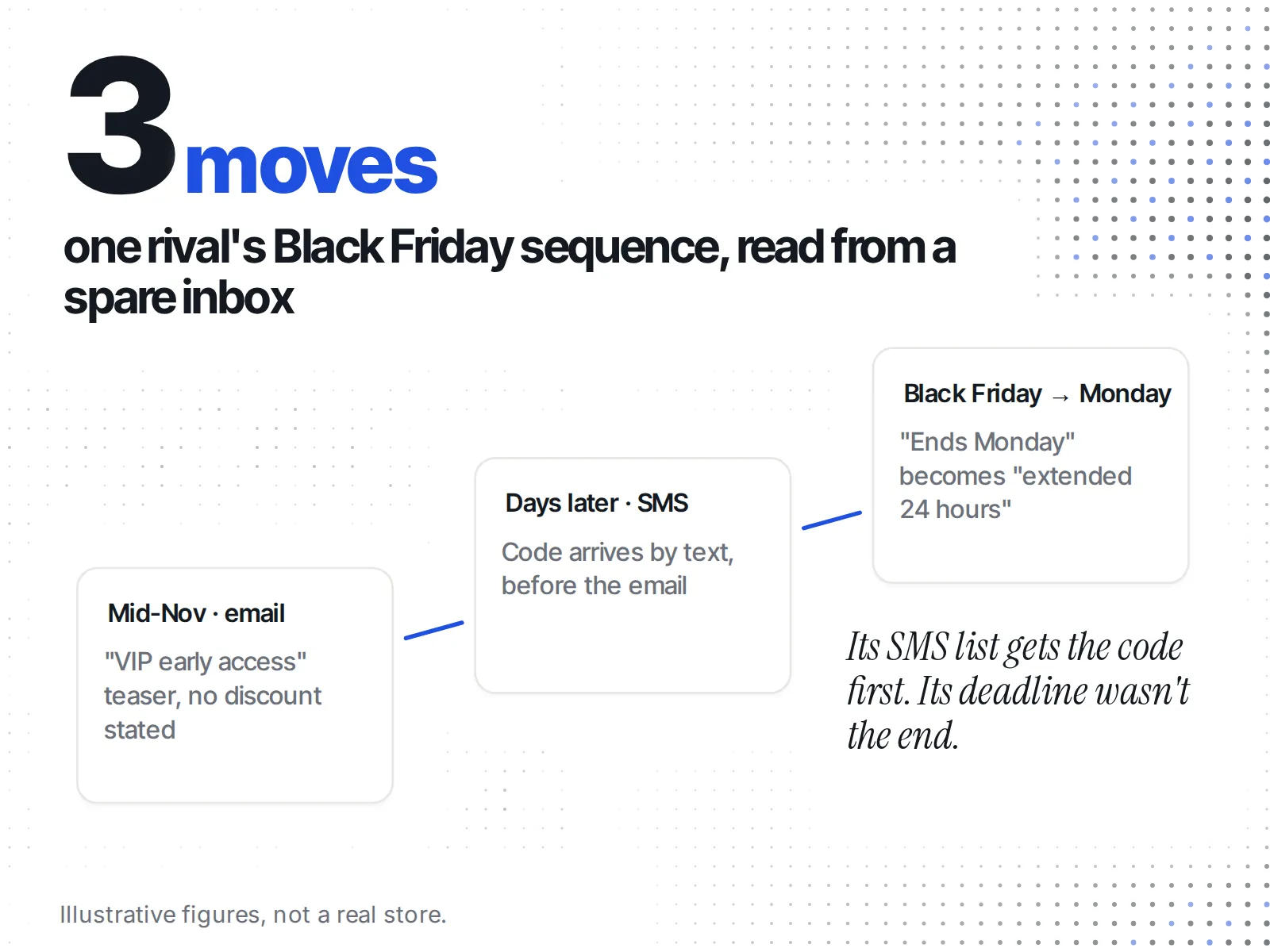
Read down that log and you learn three things you can act on. Rival A rewards its list before the public sale, so a shopper on both lists gets their offer first. Rival A texts before it emails, so its SMS list is where it puts the code. And its "ends Monday" was not the end, which tells you how much weight to give its deadlines next year.
Rival B, in the same made-up log, sends nothing until Black Friday morning and never extends. Two very different plans, both visible only from the inbox. Texting first is not a made-up habit: in Klaviyo's BFCM 2025 report, apparel and accessories brands sent 38% more texts than the year before, against 20% more emails.
Can I see past Black Friday emails without signing up?
Public email archives let you read what a rival sent in past Black Friday campaigns without joining its list. They collect brands' marketing emails, so you can study last year's sends before this year's start. They only show emails already sent; nothing here shows an email before it goes out. Two tools do this job: Milled and MailCharts.
Milled. Milled calls itself "The largest search engine for e-commerce emails." As of 11 November 2026, its homepage says "Discover 53,319,866 emails from 104,194 e-commerce brands" (milled.com). It offers "Get started for free" and a paid tier it calls "Milled Pro". Milled's pricing page did not load for us on 11 November 2026, so check the Pro price on milled.com/pricing yourself before you count on it. Milled fits a founder who wants to look up one rival's past Black Friday emails without a sales call.
MailCharts. MailCharts describes itself as a platform that "empowers marketers with competitive intelligence, industry insights, and inspiration", for email and SMS. Its homepage says "Built For: Ecommerce, Agencies, ESPs" and lists features including "Holidays", "Email journeys", "Compare", "Export emails" and "Weekly roll-up" (mailcharts.com). It shows no price: next to its pricing link it says "Contact us to get started", and its pricing URL redirects to a Litmus pricing page. MailCharts fits an agency or a team that compares many brands' sends every week and is happy to talk to sales.
| Milled | MailCharts | |
|---|---|---|
| What it is | "The largest search engine for e-commerce emails" | Competitive intelligence for email and SMS |
| How to start | "Get started for free"; paid "Milled Pro" | "Contact us to get started" |
| Price shown on its own site | Free start; Pro price not readable that day | None |
| Fits | One founder checking a few rivals | An agency or team comparing many brands |
Neither is a Shopify app; both are standalone websites. Check whether your rivals are in the archive before you rely on it. A small or new brand may not be, and then your own spare inbox is the only record.
What won't the inbox show me?
The inbox shows what a rival sent to a new subscriber. It does not show what they sent to past buyers only, what they sent to a segment you are not in, anything before you joined, or texts if you skipped SMS sign-up. Treat your log as one subscriber's view, not their whole calendar.
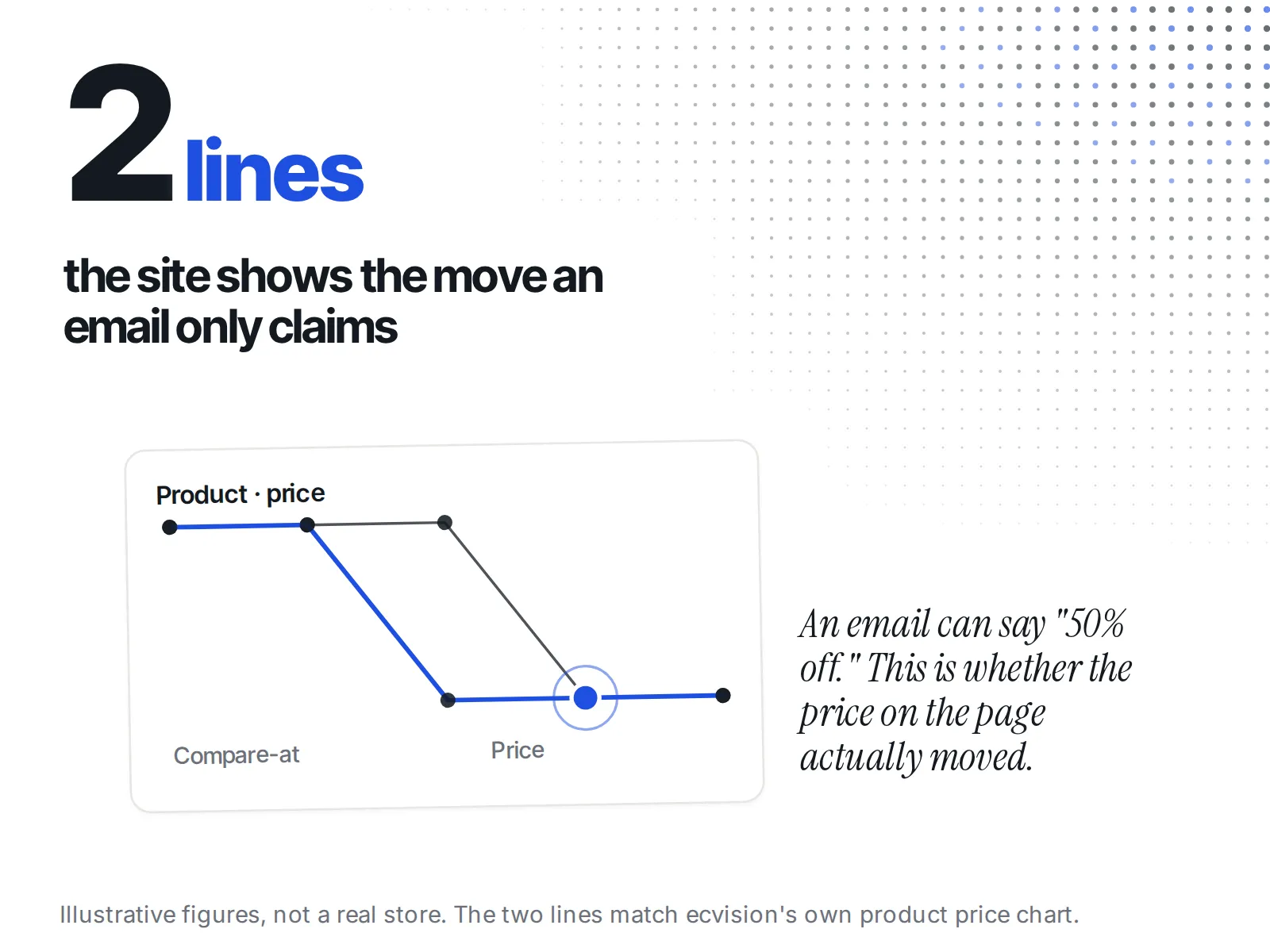
It also says nothing about what the site did. An email can say "30% off" while the product page shows a different price, or the item sells out an hour in. That is the job of watching the store itself.
This is where ecvision fits, and where it stops. ecvision, which tracks a rival's Shopify store, reads the store, not the inbox. ecvision's Starter plan lists "Every ad they run on Meta" and "Catalogue, prices and social accounts"; email is not on that list. On the Products page, the Sales Intelligence, Collections and Catalogue tabs show what the rival is selling, and an open product's price chart draws "Price" and "Compare-at" lines. So when an email says "50% off", the chart shows whether the price on the site actually moved.
What do I do with the log once the sale starts?
Read it once a day from your first early-access email to Cyber Monday night, next to what the rival's site is doing. When an email and the site disagree, the site is what shoppers pay. When a rival extends, note it for next year's plan rather than reacting on the day.
The day-by-day routine for the weekend itself, what to check and when, is in how to monitor competitors during Black Friday weekend. If a rival's email promises a big markdown, check whether the was-price is real before you match it.
The checklist
- Spare inbox and spare number set up
- Signed up to each rival's email list, with the date written down
- SMS opt-in where a rival offers it
- One folder per rival
- Log table ready: channel, arrived, subject line, discount, early access, urgency copy, code
- Past Black Friday emails looked up in Milled or MailCharts
- Site-side prices watched alongside, from early access through Cyber Monday (30 November)
- Unsubscribe after the sale if you don't want to stay on