How to Build a Competitor Watchlist for Your Shopify Store
Pick 3 to 5 stores that sell what you sell, to your buyer, at your price. Split them into daily and weekly lists, logged in one sheet before Black Friday.
Thomas Pham · · 8 min read

A competitor watchlist for a Shopify store is a short list of 3 to 5 stores that sell the same product, to the same buyer, at a similar price, plus the pages you check on each and how often. It's easy to skip the picking part: glance at whichever rival comes to mind, usually the biggest one, and call it research.
Picking by gut works until sale week. Black Friday 2026 falls on Friday 27 November, the day after Thanksgiving, which US law fixes as "the fourth Thursday in November". Cyber Monday is 30 November. If you only start looking at rivals that morning, you have nothing to compare their prices against. A list built this week gives you a baseline.
Which competitors belong on your watchlist?
The stores that belong on it pass three filters, in order: they sell the same product, to the same customer, in the same price band. A store that fails any one of them is in your category, not in your buyer's decision. Aim for 3 to 5 stores that pass all three.
Shopify's own guide to competitive analysis draws the same line. It describes direct competitors as "the brands that sell the same core product as you, often at a similar price point", and for a side-by-side comparison it says "Choose three to five competitors". It also lists indirect, legacy and disruptor competitors. Those matter for strategy, but a pre-sale watchlist only needs the direct ones.
- Same product. Not the same category. A store that sells "kitchenware" is not your rival because you sell kitchenware. It is your rival if it sells the thing your best-sellers are.
- Same customer. Ask one question of each candidate: would this store's buyer actually consider you instead, today, at this price? If the honest answer is no, it comes off.
- Same price band. A premium version and a budget version of the same product are not competing for the same cart, even when they look alike in a search result.
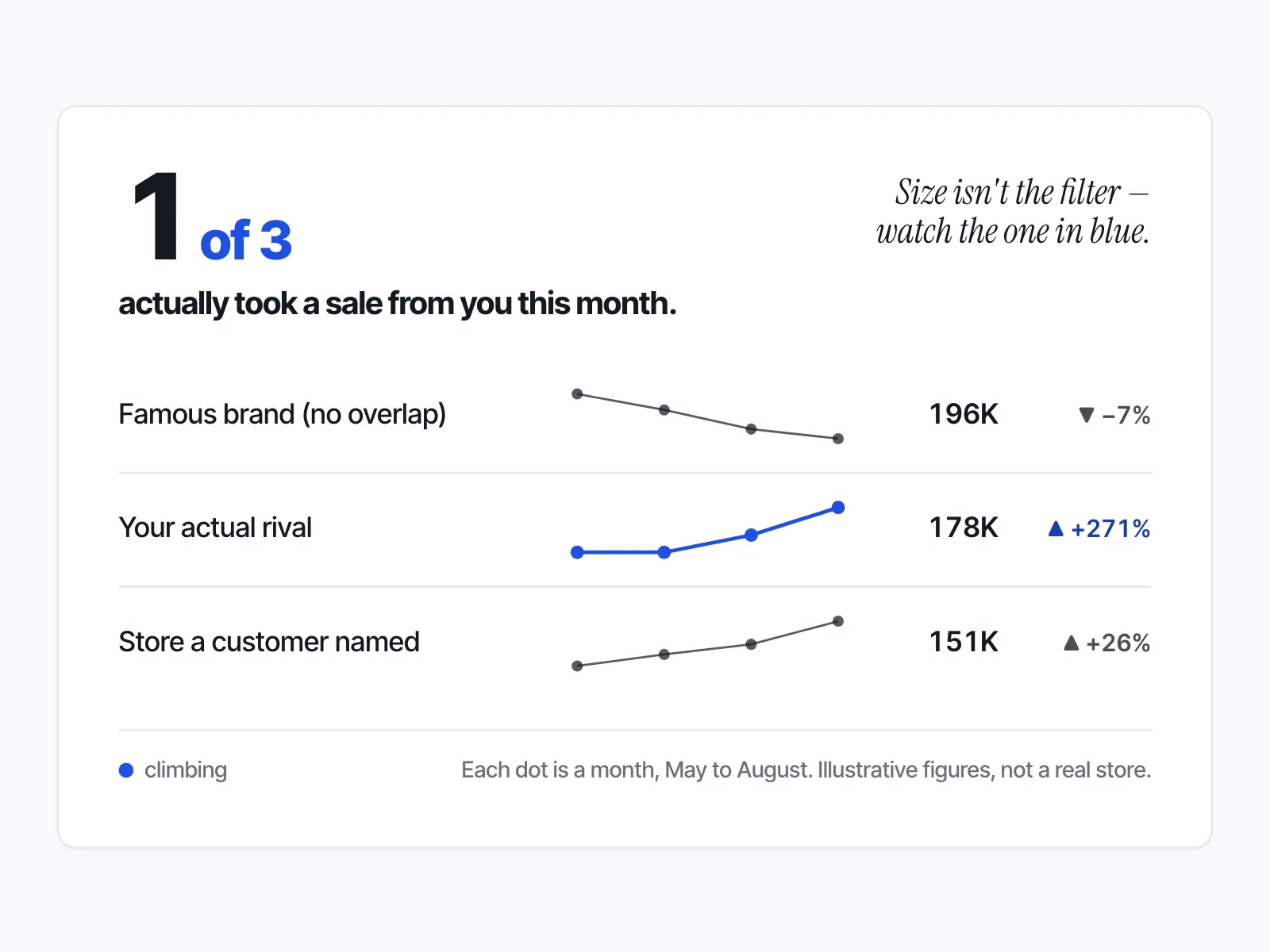
Two additions sit outside the filters. First, any store your own customers name in reviews, emails or support chats goes on the list whatever its size, because your buyers have already told you they compare you with it. Second, you may add one bigger brand, and only one, to read patterns from: when it starts its sale, how it words its banner. Watch it to learn, not to match its prices.
A worked example
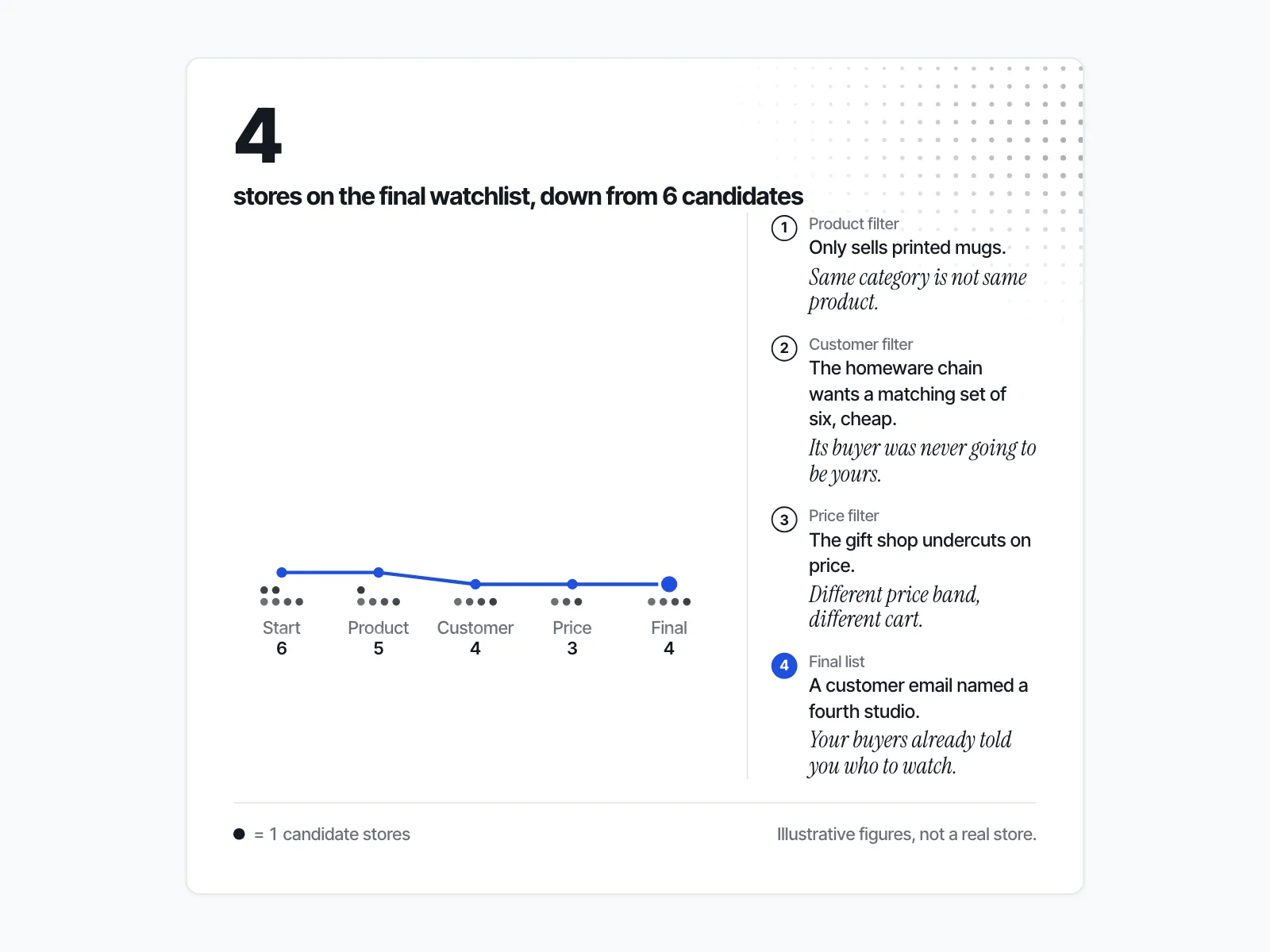
Say you sell hand-thrown ceramic mugs, and your mugs sit at the upper end of what people pay for a mug. Searching "ceramic mugs" turns up a big homeware chain, a mass-market gift shop, three other small studios and a marketplace seller.
The homeware chain sells mugs, but its buyer wants a matching set of six, cheaply. It fails the customer filter. The gift shop fails the price band. The marketplace seller sells printed mugs, so it fails the product filter. The three studios pass all three. Then you remember a customer email that said "I nearly bought from" a fourth studio you had never looked at. That one goes on too.
Your short list is four studios. The homeware chain can be your pattern-reading brand.
Why not just one rival?
A list of one or two stores cannot tell you what is normal. One rival dropping its price could be a sale, a clearance or a mistake. With three or more, you can see whether a move is one store's choice or the whole set shifting.
We built that rule into ecvision, our competitor-tracking app for Shopify brands. The tracking service will not let a workspace watch fewer than three competitors, and the reason is written in the code: "Three because the median of two rivals is just the other one". Try to remove a store from a set of three and the app refuses with "3 competitors is the minimum. Add another before removing this one." It is a product rule, not a pricing one; the code comment also says "no tier buys its way below it."
Do you need a different list for Black Friday week?
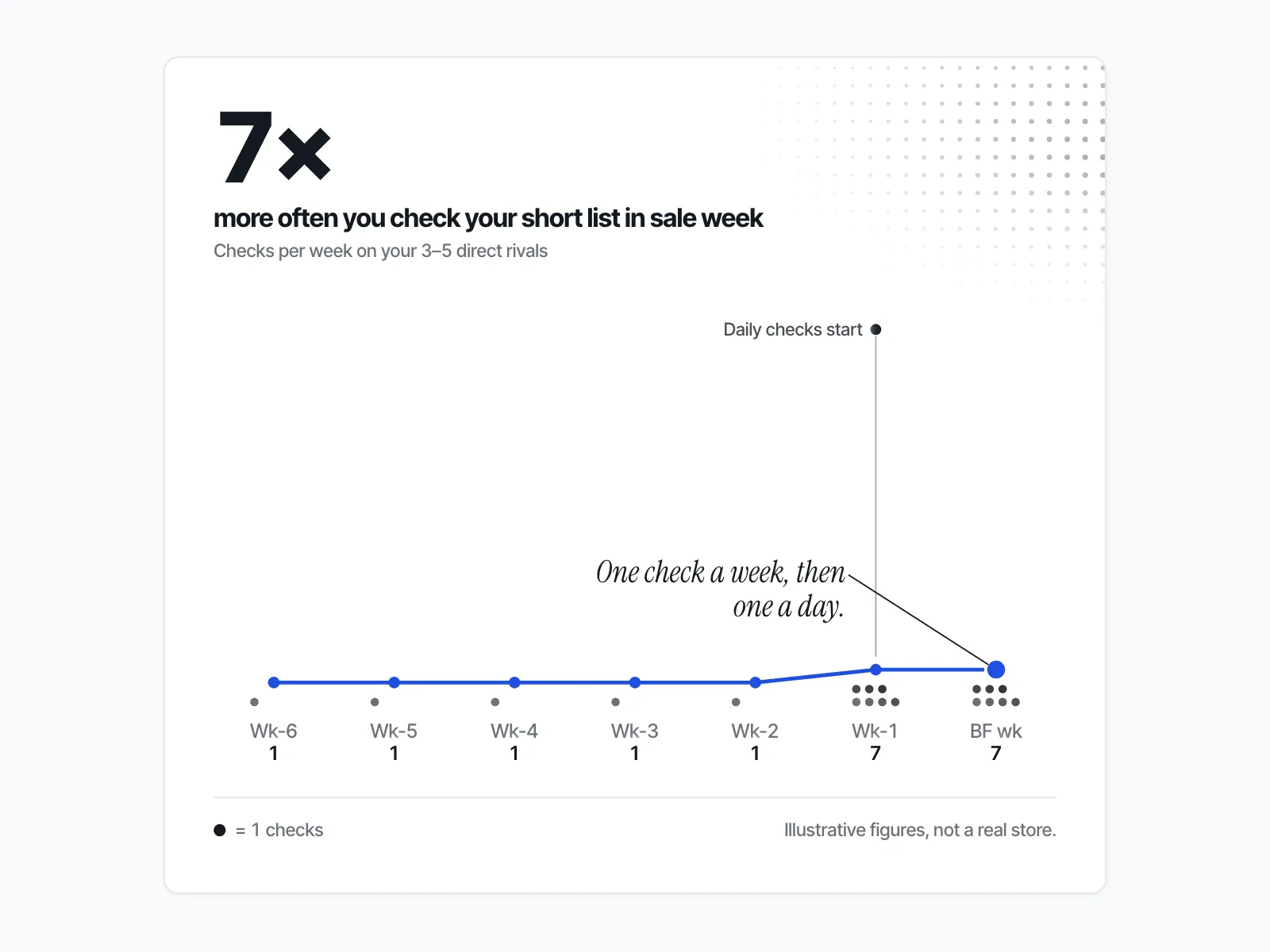
Yes. Keep one list, but split it in two. The short list, your 3 to 5 direct rivals, gets checked daily from about a week before Black Friday through Cyber Monday. A longer list of category stores worth a glance gets a weekly look, during the sale and the rest of the year.
The split matches what merchants describe. In a Shopify Community thread from February 2026, a founder asked whether people "actively monitor competitor sites for changes like pricing, promos, homepage messaging, or launches, or is it more of an occasional manual check when something feels off?" One reply, from a developer who builds a competitor-matching tool, described "a weekly manual pass (or a screenshot tool) for the few competitors that really matter" for promotions and homepage messaging. The same reply said to "Tag changes to YOUR comparable SKUs" and to leave small price moves alone, because "Most price drops revert within days".
Shopify's guide frames the question as checking "On a cadence matched to your market". Sale week is the one stretch where your market moves daily, so the short list gets a daily check for those days only. For a fuller look at the rhythm for the rest of the year, see how often to check on competitor Shopify stores.
What should you check on each store, and where?
Check five places on each store: the home page, two or three of its best-selling product pages, its sale or collection page, its ads in Meta's Ad Library, and its shipping and returns page. Note the same things each time so one day's notes can be compared with the next.
| Where | What to note | Why it matters |
|---|---|---|
| Home page | The sale banner, its wording, any countdown | The first sign a sale has started |
| 2–3 hero product pages | The price and the compare-at price | Shows the size of the discount the store is claiming |
| Sale or collection page | Which products are in the sale | Shows whether the sale is store-wide or a few items |
| Meta Ad Library | Which ads are active | Shows what the store is putting money behind |
| Shipping and returns page | Delivery cut-offs, free-shipping threshold | Changes here are easy to miss and change the real offer |
The compare-at price is the "was" price. On Shopify, a merchant sets the Compare-at price field "to the original price of the product", and Shopify says "both these amounts can be displayed on product pages and collection pages." Write both numbers down. A rival that raises its compare-at price before the sale and then "cuts" back to the old price shows up in your notes.
For ads, Meta describes its Ad Library as "a comprehensive, searchable database for ads transparency", where "People can search for all active ads running across products from Meta." Search the Ad Library for each store and note what is running, not how you guess it is doing.
The step-by-step for reading prices on a rival's store, without a tool, is in how to spy on a competitor's Shopify store.
What's the simplest way to log this without buying a tool?
A shared spreadsheet with one row per store is enough to start. Give it five columns: the store, why it is on the list, the pages you check, what you note, and how often. Add a dated tab for each check so you can see changes over time.
| Store | Why it's on the list | Pages to check | What to note | How often |
|---|---|---|---|---|
| Studio A | Same mugs, same buyer, same price band | Home, 3 hero products, sale page | Banner, price, compare-at price | Daily in sale week |
| Studio D | Named in a customer email | Home, 2 hero products | Price, compare-at price | Daily in sale week |
| Homeware chain | Pattern-reading brand | Home, Ad Library | Sale start date, banner wording | Weekly |
The "why it's on the list" column does more work than it looks. When a store's row says "same category" and nothing else, that is the row to delete.
Shopify's guide adds one habit worth keeping: "Date your evidence and refresh the parts of your analysis tied to important decisions." A price with no date next to it is no use a week later.
Once the manual sheet is running, the price side is the easiest part to automate. The Shopify Community reply quoted earlier reads catalogue changes, price and stock, from the store's own product feed rather than by opening every page. If you want that before Black Friday, set up competitor price alerts for the stores on your short list.
ecvision starts from the same place. Its settings screen holds your competitors in a panel called "Your set", and you add them one domain at a time through a field labelled "Add a competitor", with a domain like "lspace.com" as the example. The set has a floor of 3 on every plan and a ceiling that depends on the plan: 5 on Starter, 10 on Growth and 20 on Pro. Remove a store and the app tells you "Every ranking, median and chart is recalculated without it. Nothing collected is deleted." If you are not ready for a tool, the sheet does the job; the picking is the same either way. You can see how it works on the ecvision home page.
What if you're watching the wrong stores, or too many?
Both mistakes leave you with notes you cannot act on. Too many stores and the list becomes noise nobody reads. The wrong stores, usually the biggest brand in the category instead of the one taking your customers, and you react to moves your buyers never see.
Too many is the easy one to fall into: every store you add is another set of pages to open each day. The Community reply's own fix was to narrow the manual pass to "the few competitors that really matter". If a store has not changed your decisions in a month, move it to the weekly list.
The wrong stores is the costly one. A famous brand's Black Friday discount is news, and it is tempting to match it. But if its buyer would never have bought from you, matching it only cuts your margin.
Your watchlist, in one pass
Do this before Friday 20 November, a week ahead of Black Friday:
- List every store that comes to mind, plus any your customers have named.
- Cut each one that fails same product, same customer or same price band.
- Keep 3 to 5 for the short list. Add at most one bigger brand to read patterns from.
- Put everyone else on a weekly list.
- Build the sheet: store, why, pages, what to note, how often.
- Take a dated baseline of every short-list store now, so sale-day prices have something to be compared with.
For everything else to prepare in the same week, the Black Friday competitor research checklist picks up where this list leaves off.