Holiday Gift-Set Launch Calendar: Use Rivals' Real Dates
When should your holiday gift sets go live? Check the dates your rivals actually launched last year in the Wayback Machine, then set yours from that evidence.
Thomas Pham · · 8 min read
Put your holiday gift set live before November, a little ahead of the earliest rival launch that matters to you. In NRF's 2026 survey, 43% of shoppers plan to start before November. Your rivals' real launch dates from last year are in the Wayback Machine's archive of their pages, so the date you pick rests on evidence, not a guess.
Every holiday marketing blog has a date, and they don't agree: late October, early November, weeks before that. None of them say where the number came from, and none of them know your category.
When do holiday shoppers actually start buying this year?
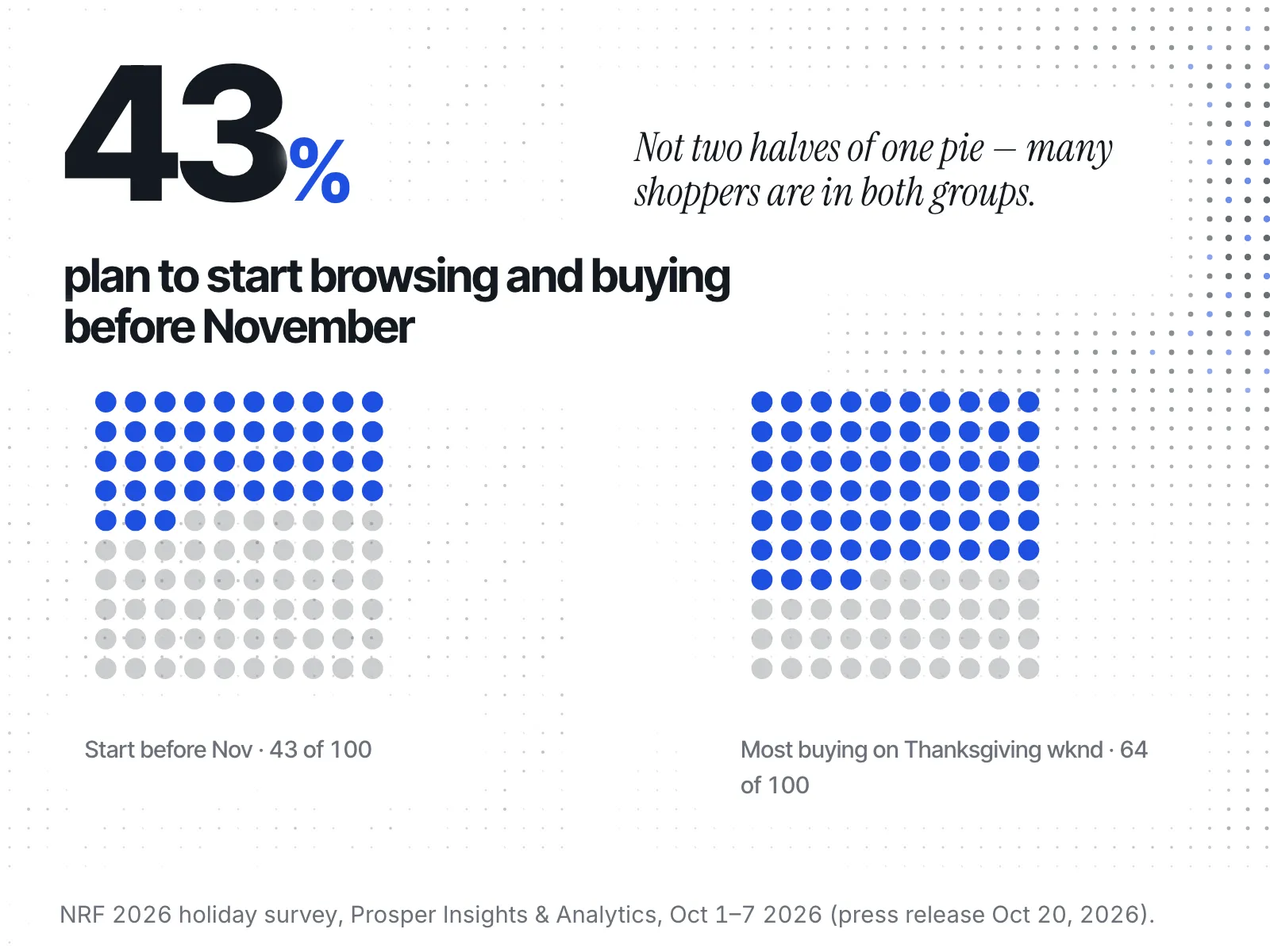
Before November for a large minority, on Thanksgiving weekend for most. In NRF's 2026 holiday survey, 43% of shoppers plan to start browsing and buying before November, and 64% say they are likely to wait until Thanksgiving weekend to do most of their shopping. A gift set has to be live for both groups.
Those figures come from the National Retail Federation's press release of October 20, 2026. The survey was conducted by Prosper Insights & Analytics, asked 8,094 adult consumers, and ran October 1 to 7.
Two details in it change how you plan:
- The two figures barely moved from last year. The 43% compares with 42% last year, and the 64% with 63%. When shopper timing holds steady, last year's rival launch dates are still a fair guide to this year's.
- Both groups are watching price. Shoppers who hold off say they expect better prices later: 46% of them plan to wait until November and December, because that is when they find the best prices and promotions. Of those starting early, 37% say the prices and promotions are too good to pass up. An early gift set that goes live with no offer attached is asking the early group to buy for reasons they didn't give.
The fixed dates this year: Thanksgiving falls on November 26, 2026, the fourth Thursday in November under 5 U.S.C. § 6103. That puts Black Friday on November 27 and Cyber Monday on November 30.
When did your rivals launch their gift sets last year?
You can bracket a rival's gift-set launch date from Wayback Machine captures of its gift or holiday collection page. Enter the URL of a rival's gift or holiday collection page, press "Browse History", and open the captures either side of last year's launch. The last capture without the gift set and the first capture with it bracket the date it went live.
Here is the method, step by step. The mechanics come from the Internet Archive's own help page, Using the Wayback Machine.
- Pick three to five rivals whose customers overlap with yours. A gift set from a brand in a different category tells you little about your shoppers.
- Copy the URL of each rival's gift or holiday collection from their site's menu. If it no longer exists, use their homepage, which may carry a launch banner.
- Enter the URL in the Wayback Machine and press "Browse History". Each capture shows as a coloured dot.
- Open the blue dots. Blue means the crawler got a good (2nn) response. Green means a redirect (3nn), orange a client error (4nn) and red a server error (5nn), so those captures may not show you the page itself.
- Find the bracket. Work back from December. Open captures until you find the last one where the gift set is missing and the first one where it is on the page.
- Write down both dates, not a guess between them. The launch happened somewhere in that window.
Two shortcuts help. Every archived address carries its capture time in a 14-digit code, read as yyyymmddhhmmss, so a capture at /web/20251103090000/ was taken on November 3, 2025, at 09:00:00. And to list every capture date for one page, replace that date code in the address with an asterisk (*).
A worked example
Say you sell candles and track three rivals. This is hypothetical, to show the reasoning, not a record of any real store.
Rival A's "Gifts" page has captures through the autumn. The last one without the gift set falls in the second week of October; the first one showing it falls in the third week. Rival A launched in the third week of October, give or take a few days.
Rival B's holiday collection has no captures before December. That is not a late launch. It is an unknown, so you check Rival B's homepage instead and find a holiday banner appearing in early November.
Rival C has no captures at all for the season. You record Rival C as unknown and move on.
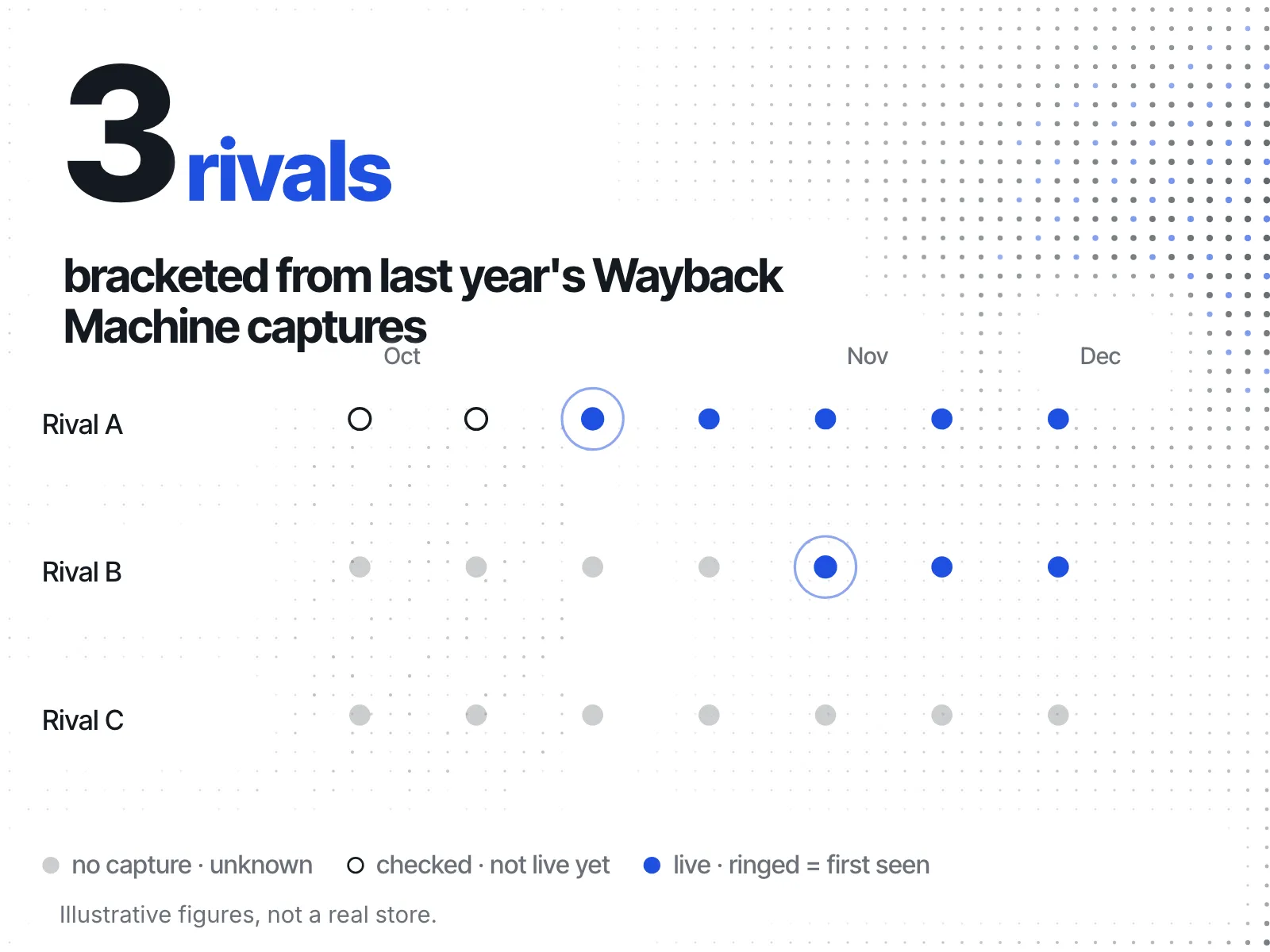
Your earliest checked rival went live in the third week of October. If you want the shoppers who start before November, your set should be live a few days ahead of that. If your margin can't carry an early offer, you might instead aim to launch with Rival B in early November and put your weight on Thanksgiving weekend. Either way, the date now rests on something you looked at.
What can't the Wayback Machine show you?
The Wayback Machine can't show any page version it didn't capture. The Internet Archive says "Not every date for every site archived is 100% complete." Pages can be missing because they were password protected or excluded by a site's robots.txt file. A blue dot shows what the page looked like on that day, not when the shop changed it.
So read your findings with two limits in mind:
- Gaps hide the real date. If captures sit weeks apart, your bracket is weeks wide. Say so in your notes rather than picking the midpoint.
- A capture is what the crawler saw. A gift set might have been live to some visitors before the crawler arrived. Treat the first capture with the set as "live by this date", which is a bound, not the launch itself.
If you check a rival's page this season rather than last year's, allow for lag: there is a 3 to 10 hour delay between a crawl and the capture appearing, per the same help page.
What if there's no capture of the page you need?
If a rival's page has no Wayback capture for last season, record its launch date as unknown. A rival with no captures has not launched late or skipped the season. You simply have no evidence either way. Try their homepage for the same weeks, or another rival that was captured.
If two of your four rivals come back empty, your calendar rests on two data points, and you should hold it more loosely than one built on four. Don't fill the gap with a date from a holiday marketing blog written for a different category.
If none of your rivals ran a dedicated gift set last year, that is also a finding. Your category may not shop in sets, and the right move may be to skip the early launch and put the effort into the weeks shoppers already use.
How do you set this year's launch date from the evidence?
Take the earliest rival bracket you trust, move a few days ahead of it, and check that date against the two NRF groups. If it lands before November, you reach the 43% starting early. Then make sure the set is still visible and stocked from Thanksgiving on November 26 through Cyber Monday on November 30, because 64% are likely to wait until Thanksgiving weekend to do most of their shopping.
A simple planning table keeps it honest:
| Rival | Page checked | Last capture without set | First capture with set | Confidence |
|---|---|---|---|---|
| Rival A | Gift collection | (your date) | (your date) | Narrow bracket |
| Rival B | Homepage | (your date) | (your date) | Wider bracket |
| Rival C | Gift collection | none found | none found | Unknown |
Fill it in from your own captures. Then decide two dates, not one: when the set goes live, and what it offers on Thanksgiving weekend. The NRF figures say price drives both groups, so plan the offer alongside the launch. When you get to the offer itself, the guide to tracking a rival's discount calendar covers how to see their sale timing, and how to see when competitors start their Black Friday sale covers the days around November 27. The rest of your prep is in the Black Friday competitor research checklist.
Once the set is live, rivals selling out of theirs is a different signal again; what a competitor's Shopify inventory can and can't tell you explains how far to trust it.
How do you keep the calendar without redoing the research next year?
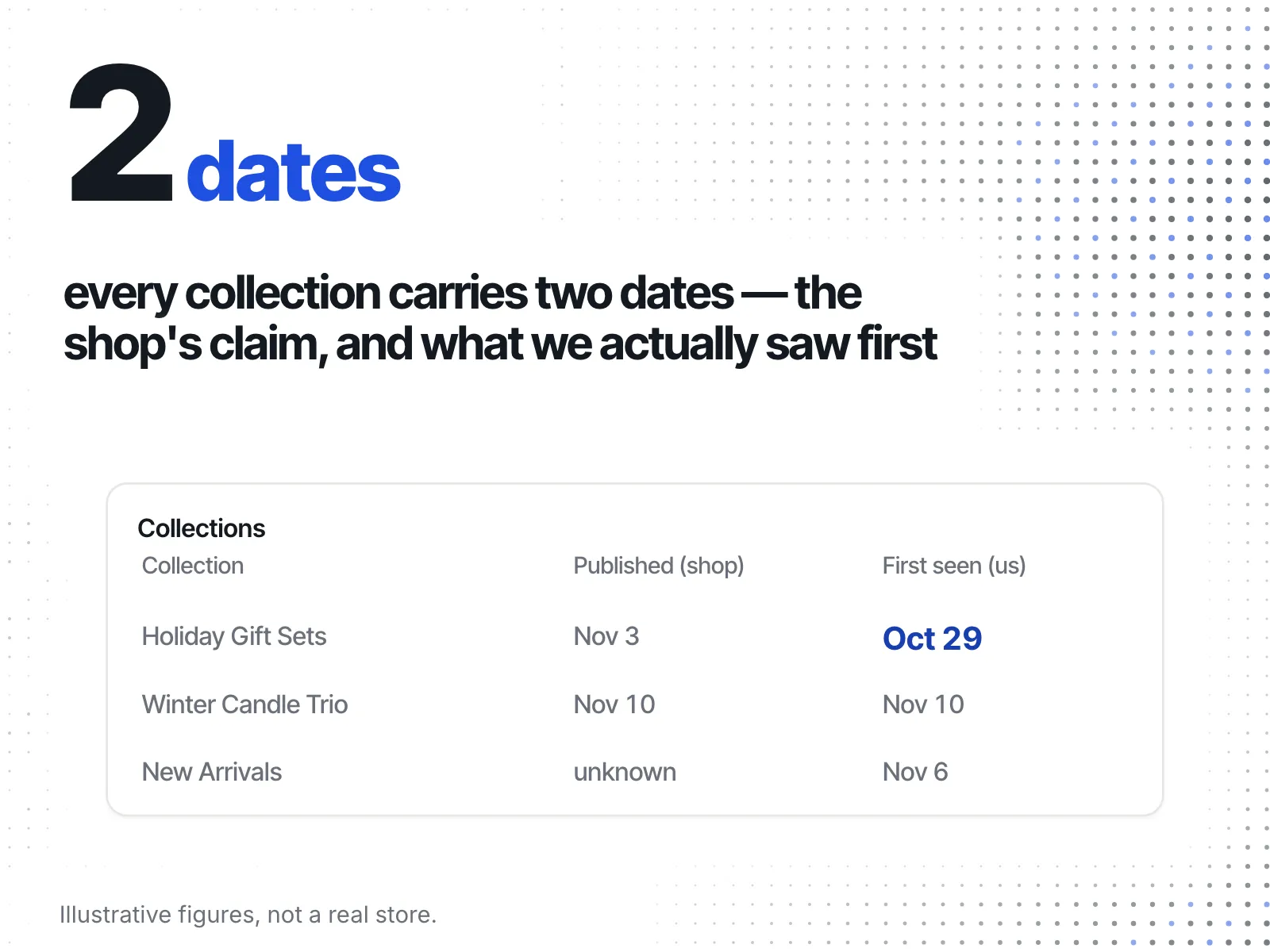
Record the dates as they happen instead of rebuilding them each autumn. ecvision, a Shopify competitor-analysis tool, has a Collections table that shows two dates for each collection on the stores you track: "Published (per the shop)" and "First seen by us". The first is what the shop's own data says. The second is when ecvision's crawler first found the collection.
A shop's publish date is a claim the shop controls. "First seen by us" is a dated observation, which is the same kind of evidence you just dug out of the Wayback Machine, collected as it happens rather than after the fact.
The table's "Kind (inferred)" column labels some collections "Seasonal drop" or "Occasion". ecvision's explainer for that column reads: "Inferred by a language model from each collection's name and size, and shown only where it was at least 70% sure." The labels describe how a shop organises its catalogue, not what sells. Track your rivals through this season, and next October the gift and holiday collections they added sit in one table with both dates beside them. You can see what that costs on the pricing page.
Your gift-set launch checklist
- Pick three to five rivals whose shoppers overlap with yours.
- For each, open last year's gift or holiday collection in the Wayback Machine with "Browse History".
- Open blue dots only, and note the last capture without the set and the first with it.
- Record missing captures as unknown, never as a late launch.
- Set your launch a few days ahead of the earliest rival bracket you trust.
- Check the date against NRF's two figures: 43% start before November, 64% are likely to wait until Thanksgiving weekend to do most of their shopping (Thanksgiving is November 26, 2026).
- Plan the Thanksgiving-weekend offer with the launch, not after it.