How to track a competitor's TikTok ads for free
TikTok's two official tools do different jobs. Which one finds a named rival's ads, where it goes blind, and why their profile can hide the ads they run.
Thomas Pham · · 9 min read
A rival's videos keep turning up in your feed, yet their TikTok profile looks quiet. You want to see what they are actually running, and you don't want to pay for a spy tool to find out.
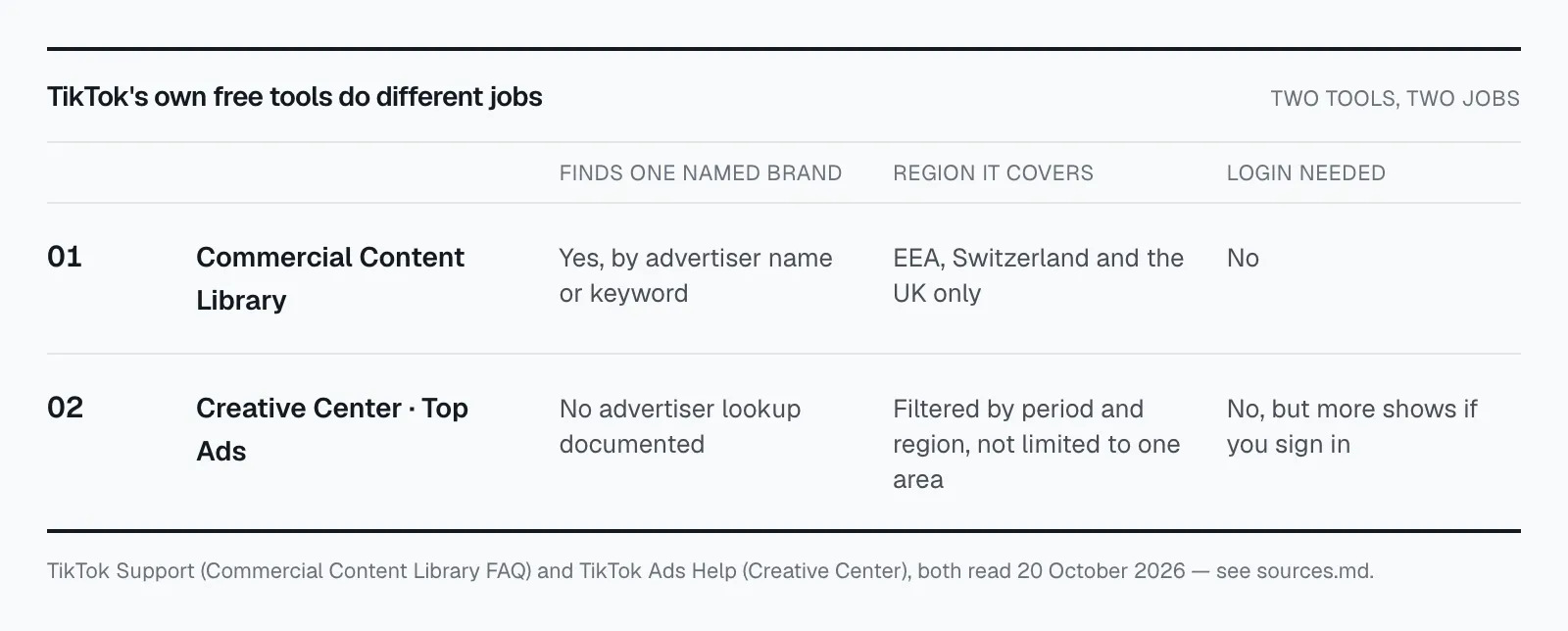
To track a competitor's TikTok ads for free, use TikTok's own two tools for two different jobs. The Commercial Content Library lets you search a named advertiser, but only for ads shown in the EEA, Switzerland and the UK. Creative Center shows top ads by period and region, not by brand. Their profile fills some gaps, with a blind spot covered below.
Most guides we read blur these into one "TikTok ads library". They aren't one thing, and mixing them up is how people end up searching the wrong place for a rival who isn't there.
Updated 21 October 2026.
Can you search a specific brand's TikTok ads for free?
Yes, with the Commercial Content Library (CCL). It is TikTok's own searchable record of ads, open to anyone without an account. You search by advertiser name or keyword, then filter by target country, ad type and published date. Of TikTok's two tools, it is the one that looks up a single brand.
TikTok describes it as "a repository of ads and other commercial content posted on TikTok", and says plainly: "You don't need a TikTok account to access, search, or use our CCL." (TikTok Support, read 20 October 2026.)
The search box takes "Advertiser name or keyword". The filters TikTok lists are "Ad target country, Ad type, and Ad published date". That is enough for a simple routine:
- Search the rival's brand name as the advertiser.
- If nothing comes back, try the name of the company behind the brand, or a product name as a keyword, in case the ad account uses a different name from the shop.
- Set the target country to the market you share with them.
- Narrow the published date to the last few weeks, so you see what is new rather than everything they have ever run.
Write down what you find each time, with the date. One look tells you what is live. A dated note every week tells you what they kept and what they dropped, which is the part you actually learn from. We wrote more about that in how long to watch a competitor's ad before you copy it.
Does the TikTok ad library cover US brands?
Only partly. TikTok says the library "currently includes information on ads available to users in the European Economic Area (EEA), Switzerland, and the U.K." An ad shown only to people in the US, or anywhere else outside those markets, is not in it. A rival who advertises only to US viewers can return no results at all.
This is the limit most "free ways to see TikTok ads" roundups leave out. Two current guides we read describe one TikTok ads library you can search by advertiser name and filter by country, format and date, and never name a region. A reader in the US follows that, searches a US rival, gets nothing, and concludes the rival isn't advertising.
That conclusion is wrong. An empty result in the CCL means "no ads shown to people in the EEA, Switzerland or the UK". It does not mean "no ads". Treat the gap as unknown, not as zero.
Say you sell swimwear from the US and a rival ships to both the US and the UK. Search them in the CCL and you may well find their UK ads. Their US-only ads won't be there. So you'd see one slice of their TikTok spend and none of the rest, and it's easy to mistake that slice for the whole picture. If your rival only ever advertises to US viewers, the library can't help you with them at all, and the next two methods are what you have.
For how this compares with what Meta and Google publish, see our side-by-side of the Meta, Google and TikTok ad libraries.
What does TikTok Creative Center show you?
Creative Center shows the ads TikTok picks out across the platform, not what one rival is doing. Its Top Ads section is "a collection of high-performing creatives from the TikTok platform", filtered by period and region. The help page documents no way to look up a single advertiser. Use it for ideas, not surveillance.
TikTok calls Creative Center "a free, public home to an ever-growing suite of creative resources" for trends, ad examples and best practice (TikTok Ads Help, read 20 October 2026). You don't have to sign in: "While a login is not required to access Creative Center, we recommend logging into Creative Center to take advantage of and see all of its features, data, and insights." So signing in gets you more of it.
Where it earns its place in a competitor routine is the market view. Filter Top Ads to your region and a recent period and you see the creatives TikTok has picked as high-performing there. If your rival's videos look like those, their style matches what TikTok is picking out. If they look nothing like them, that's worth noticing too.
What it won't do is tell you whether your rival is among those ads. "High-performing" is TikTok's label for its own selection, and it says nothing about the brands that aren't in it.
Can you just watch a rival's TikTok profile?
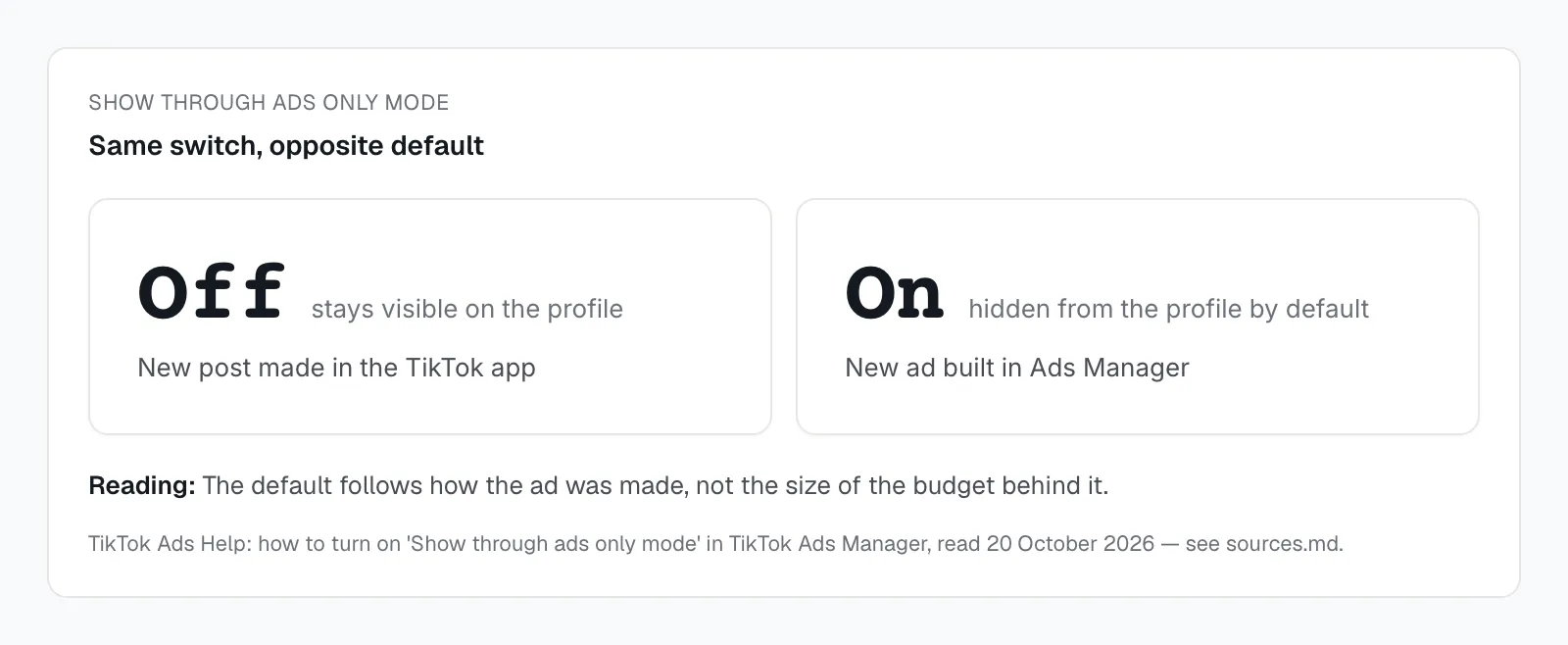
You can, and you should, but it can miss the ads they build in Ads Manager. TikTok has a setting called "Show through ads only mode" that keeps a post off the profile and out of the organic feed, shown only as an ad. It is on by default for every new ad made in TikTok Ads Manager.
TikTok's own help page spells it out (TikTok Ads Help, read 20 October 2026):
- "When Show through ads only mode is turned on for an ad or post, the post will not show up as an organic post in the feed, only as an ad."
- "Show through ads only mode is toggled on by default for newly created ads within TikTok Ads Manager".
- It "is toggled off by default for new posts within the TikTok app".
- "If Show through ads only mode for the post was enabled via TikTok Ads Manager, the post will not be visible on the profile even to the account owner."
So the defaults split along how a brand advertises. A post made in the app and then promoted starts out visible on the profile. An ad built in Ads Manager starts out hidden from it, and stays hidden unless someone switches the setting off. A brand with a media buyer working in Ads Manager can be running plenty of ads while its profile shows only what it chose to post.
That default is the reason "just check their profile" quietly undercounts.
The profile is still worth a weekly look. It tells you what the brand wants to be seen saying: the products it pushes, the tone, the offers it is happy to post in public. Just read it as their shop window, not their ad account.
What does a paid TikTok spy tool add?
Mostly, you pay for time: someone else does the searching and sorting. Before you pay, ask the vendor one question: where does it get an ad that was shown only in the US with ads-only mode on? A clear answer is worth paying for. A vague one tells you its limits.
TikTok's free sources have hard edges: only the EEA, Switzerland and the UK in the library, no brand lookup in Creative Center, a default that hides ads from the profile. Ask how the tool gets past each one. And first, run the free routine for two weeks on the rivals you care about. You'll know which of those gaps actually hurt you, and you can ask a vendor about exactly those.
Where does ecvision fit?
ecvision's "Ads" screen reads the Meta Ad Library, not TikTok. Its creative states ("Scaling", "Testing", "Kept running", "Steady", "Winding down", "Cut early" and "Ended") describe what a brand did with each ad, read from what that library publishes. TikTok comes into ecvision on the Social screen instead, as a tracked store's public posts.
To find those accounts, ecvision reads the store's own site. The Social screen says why: "We only follow accounts a store links from its own site. Guessing a handle from a domain would collect a stranger's account." Posts from your tracked rivals land in one feed, with filter groups for "Stores", "Platform", "Angle" and "Offer". The "Angle" group carries an "inferred" mark, because a model read the caption. You can sort by "Newest", "Most liked" or "Most commented".
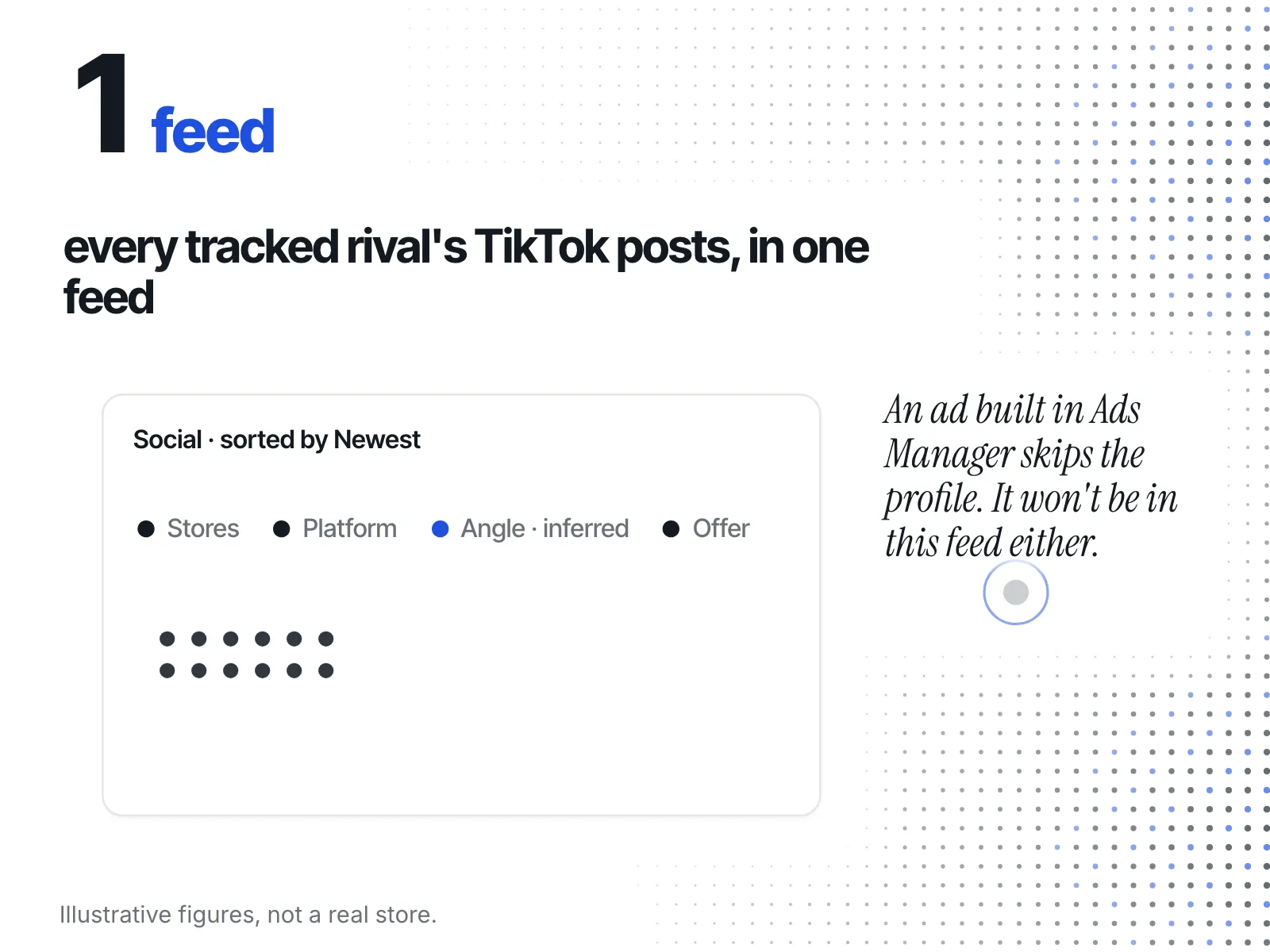
That covers the shop-window half of this post for every rival at once, without you opening TikTok. It doesn't get round the ads-only default: Social follows the account's public posts, so a post that never reaches the profile isn't there either. For the ads themselves on TikTok, the CCL is still the place to look. For a wider look at what you can check on a rival's store, start with how to spy on a competitor's Shopify store, or see what ecvision tracks and its plans.
A free weekly routine for one rival's TikTok ads
Here it is as a checklist you can run every week:
- Commercial Content Library: search the rival as advertiser, then by keyword if the name returns nothing. Filter to your shared country and recent weeks. Note what is new, with the date.
- If they never advertise in the EEA, Switzerland or the UK: expect an empty result. Write it down as "not covered", never as "not advertising".
- Creative Center Top Ads: filter to your region and a recent period. Note the formats in TikTok's picks, and whether your rival's style matches.
- Their profile: scroll the newest posts. Note the products and offers they push in public. Remember that ads built in Ads Manager are hidden from it by default.
- Your notes: keep one dated line per rival per week. The pattern over a month says more than any single look.
- Before paying for a tool: check which of these gaps cost you a decision, and ask the vendor about those.
Sources
Read on 20 October 2026 and re-checked on 21 October 2026.
- TikTok Support, Commercial Content Library: what the library holds, searching by advertiser name or keyword, and its coverage of the EEA, Switzerland and the UK.
- TikTok Ads Help, Creative Center: Top Ads, its period and region filters, and access without a login. The tool itself is at ads.tiktok.com/creative/creativeCenter.
- TikTok Ads Help, the "Don't show on TikTok profile" option in Ads Manager: the ads-only default for ads built in Ads Manager.
- Meta Transparency Center, Ad Library tools: the library ecvision's Ads screen reads.
- ecvision, the Ads and Social screens, as they appear in the app today.