Should You Offer a Black Friday Price Guarantee?
Guarantee your own price, match a rival's, or offer neither? How to pick one before Black Friday, set its limits and refund it in Shopify.
Thomas Pham · · Updated · 8 min read
Your early deals are live, and the question in your inbox is always the same: "If I buy now and the price drops on Black Friday, do I lose out?" You need one written answer before the week starts. A Shopify store has three: guarantee your own price, match a rival's lower price, or offer neither and say your sale price is the floor.
Any of the three can be right. What hurts is deciding case by case in the support inbox during sale week.
Updated 5 November 2026: Target's early sale runs 5–7 November and Walmart's early event starts 12 November. Amazon and Best Buy dates: not yet announced.
What is the difference between a price guarantee and a price match?
A price guarantee covers your own price: if you cut it after someone buys, you refund the difference. A price match covers a rival's price: if a shopper finds the same item cheaper elsewhere, you sell at that price. The first only depends on your own decisions. The second depends on someone else's prices.
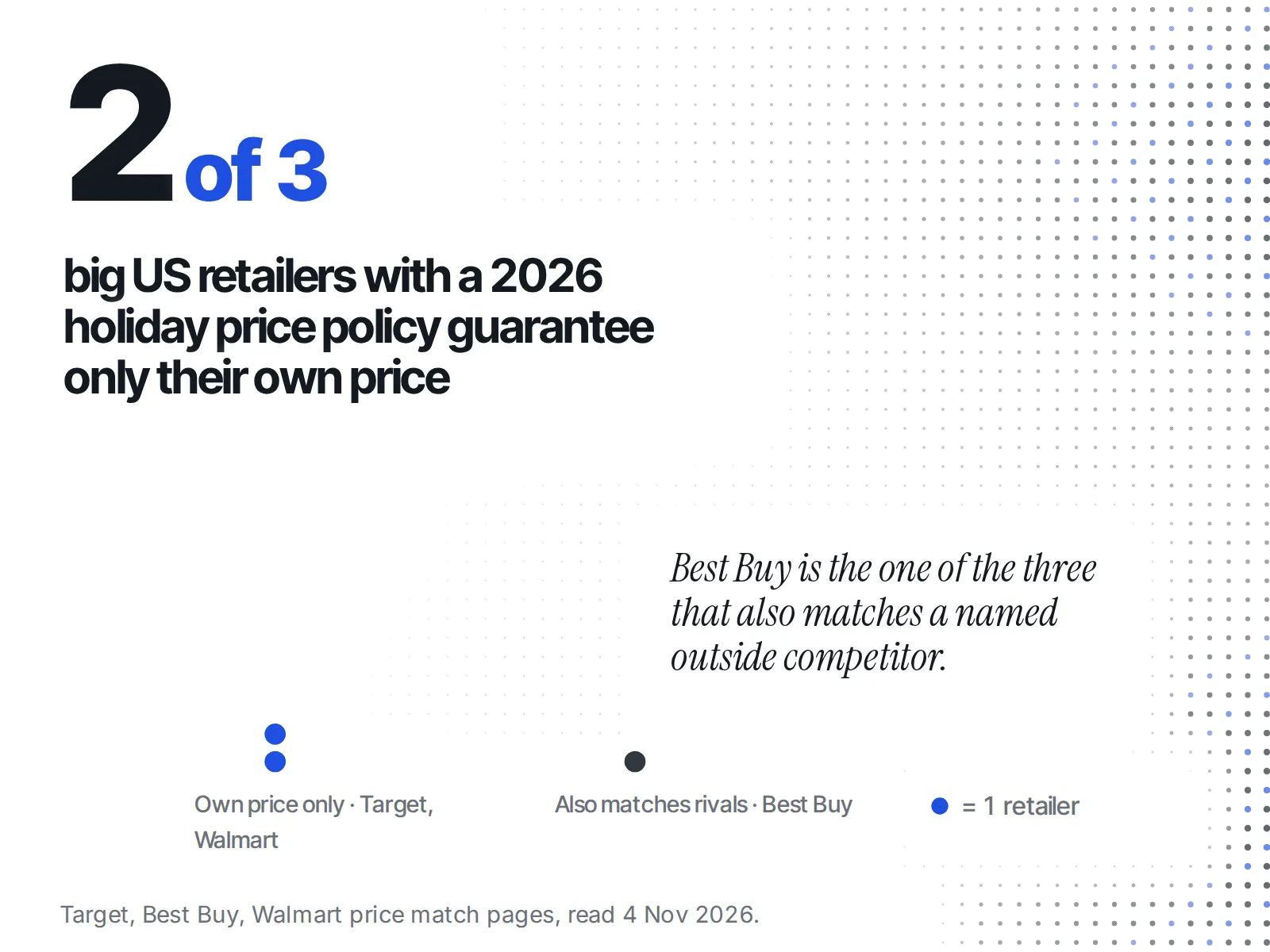
The big US retailers show the split.
- Target guarantees its own price only. Its price match policy says: "We'll match the price if you buy a qualifying item at Target and then find the identical item for less at Target.com, in Target stores or with a Target Circle™ deal."
- Best Buy matches outside rivals. Its Price Match Guarantee, effective 30 October 2026, covers "key online and local competitors" on "immediately available new products." It doesn't match rivals' Black Friday pricing, Thanksgiving Thursday through Cyber Monday.
- Walmart stores match Walmart.com's own price for the identical item, and Walmart.com does not match "prices offered by competitors," according to Walmart's own answer.
Which of the three options fits your store?
Pick by margin first, then by how many buy before your deepest price. A guarantee fits when you have room left and plan a deeper cut. A rival match fits when you sell the same branded items as named rivals. Neither fits when your sale price is already near cost.
| Guarantee your own price | Match a rival's lower price | Offer neither | |
|---|---|---|---|
| Margin room after your sale price | Some room left | Room to drop to a rival's price | Little or none |
| Is a deeper Black Friday price planned? | Yes, and you want early buyers anyway | Doesn't matter | No, the early price is the price |
| Do rivals sell the identical item? | Doesn't matter | Yes, same brand and variant | Doesn't matter |
| Early buyers before your deepest price | A small number you can afford to refund | Any | Any |
| Admin work in Shopify | A partial refund per claim | A check on the rival's page, then a partial refund or a discount | None, one line of copy |
| Main risk | Refunding every early order if the cut is deep | Honouring a price that wasn't real or in stock | Losing early buyers who wanted the safety net |
If two columns fit, pick the narrower one. Widening a policy later is easy; taking one back costs trust.
A worked example: one store, three answers
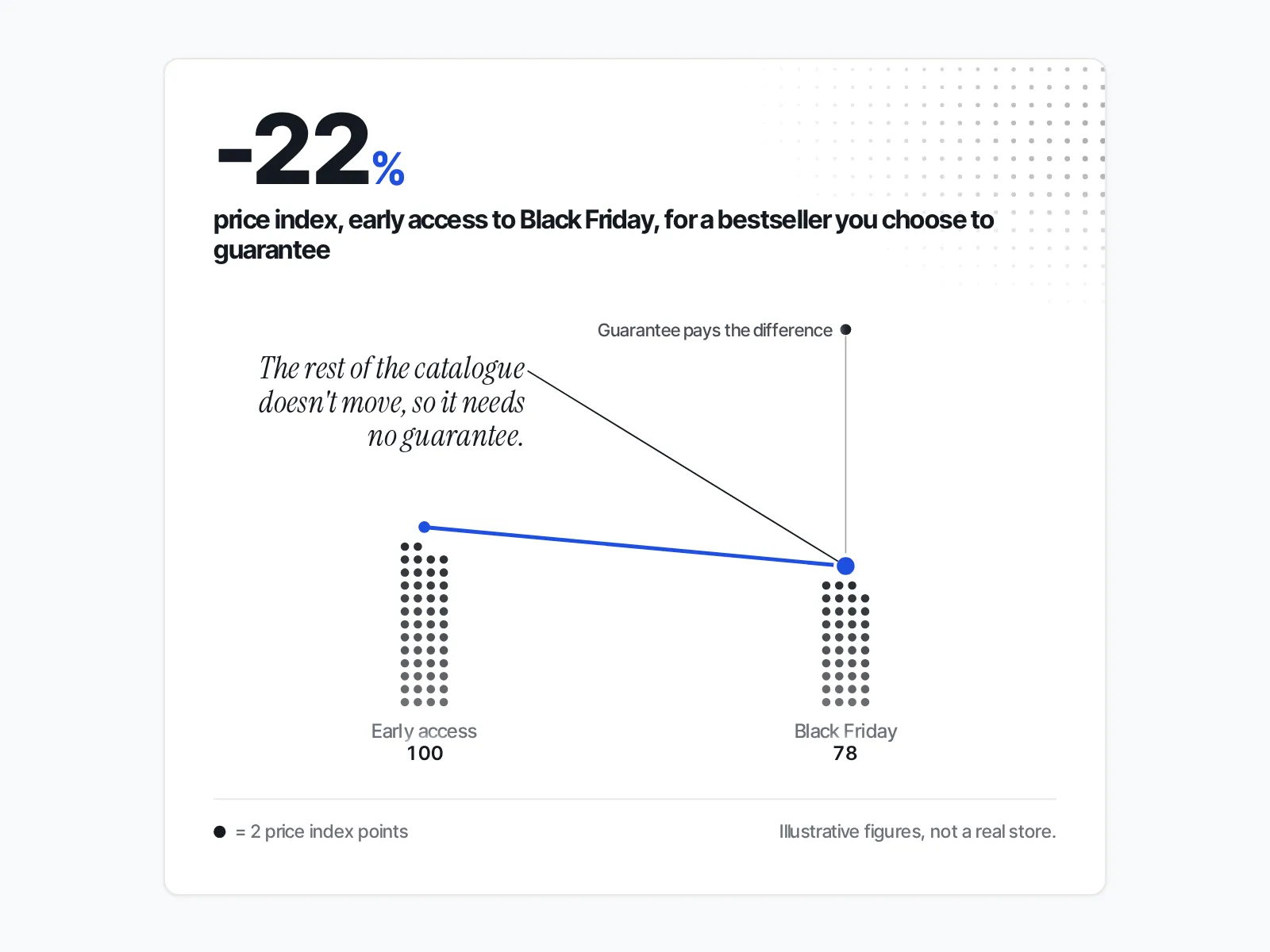
Say you sell handmade ceramic planters and open early access a week before Black Friday. On the big day you plan to go deeper on two bestsellers.
A guarantee on those two bestsellers makes sense. You know their price will drop, and refunding the difference keeps early buyers happy. The rest of the catalogue keeps its price, so needs no guarantee.
A rival match doesn't apply: nobody else sells your planters.
If you guarantee your own price, what should the policy say?
Copy the shape of the big retailers' policies, scaled down. State which products are covered, the date window, the one claim per item, and that refunds go back as a partial refund. Write the exclusions before anyone asks.
Here is what the big policies set, read on 4 November 2026:
| Retailer | Standard window | Holiday window | Notable exclusions |
|---|---|---|---|
| Target | 14 days after purchase | Bought from 1 November 2026, price drops at Target on or before 24 December 2026 | Clearance, open-package, refurbished, bundles, pricing typos |
| Best Buy | At purchase | Items bought 30 Oct to 31 Dec can be matched to Best Buy's own price through 15 Jan | Marketplace, clearance, refurbished, open-box |
Target's page says: "Price matches may be requested at time of purchase or within 14 days after purchase." Its exclusion list starts: "Clearance, closeout, liquidation sales, damaged, used, open package, refurbished, pre-owned, or rent / lease to own items."
A small store needs a shorter window. A version you can run:
- Name the products. List the items covered, or say "every full-price item in the early-access sale".
- Name the window. From your early-access start to the end of Cyber Monday is enough.
- Name the store. Your own website only. Not your wholesale stockists, not a marketplace listing.
- One claim per order. The difference is refunded once, to the original payment.
- Name the exclusions. Clearance, bundles, gift cards, and a price set by mistake.
If you match a rival's price, how do you check it first?
Before you honour a rival's lower price, confirm four things: it is the identical item and variant, the price is live today, the item is in stock, and the rival sells it, not a marketplace seller. A screenshot shows the item but proves none of the other three. Open the rival's page yourself.
Best Buy's own rule is a good template: "One price match at the time of purchase, per identical item, per customer." It excludes marketplace products, clearance, refurbished and open-box items. Walmart puts the call with a person: "The Walmart store manager on duty has the final decision on any price match." Put the same line in yours.
The checks, in order:
- Same variant. A rival's cheapest size or colour is often the one a shopper finds. Match only the variant they bought.
- Live price. Yesterday's sale isn't today's price.
- In stock. A price on a sold-out item isn't one a shopper can pay.
- Real discount. If the rival's "was" price looks inflated, check it the way you would check whether a competitor's Black Friday was-price is real before you take it as a reference.
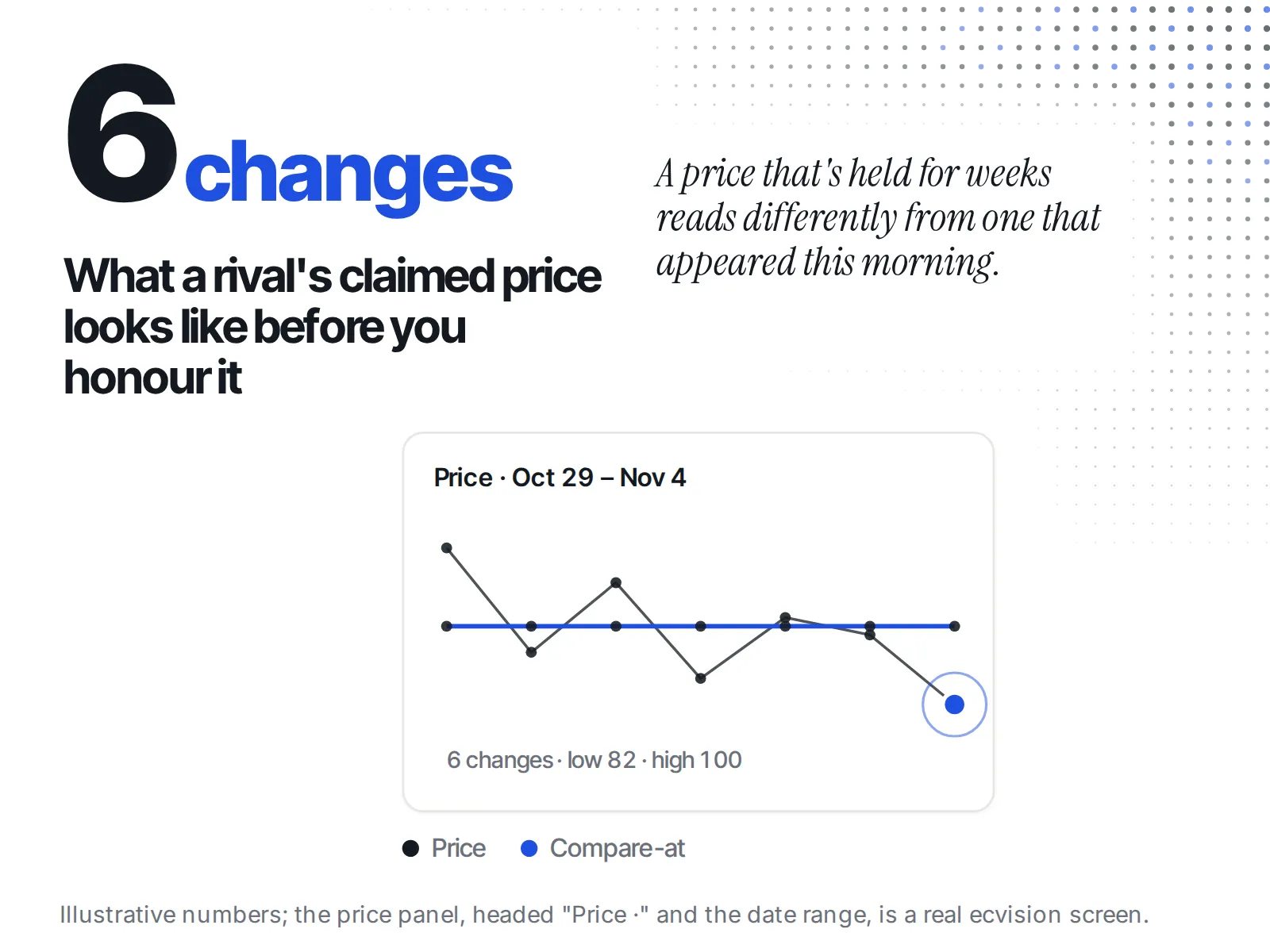
This is where history beats a single page view. In ecvision, open a rival you watch and go to the Sales Intelligence tab of the Products page. Each product there has a price panel, headed "Price ·" and the date range of its readings. It draws the price as a line, adds a "Compare-at" line when the product has one, and marks each change as "{from} → {to}" at the reading where it was first seen. The summary line says how many changes there were, with the low and the high, or "flat across {n} readings" when the price never moved. A product the rival marks unavailable shows "Sold out", and the "Sizes in stock over time" panel shows when sizes sold out and marks each "Back in stock".
So when a customer emails a rival's price, you can see whether it appeared this morning, has held for weeks, or belongs to a variant that sold out on Tuesday.
Cutting your own price to match a rival's sale is a different decision: see whether to match a competitor's Black Friday discount on clothing.
How do you stop a price guarantee from being abused?
Limit it the way the big retailers do: the identical item, in stock, inside a stated date window, one claim per item per customer, against prices on your own channels or a named list of rivals. Each limit comes from the policies above:
- Identical item only. Target and Walmart both say "identical item".
- In stock now. Best Buy covers "immediately available new products."
- One per item, per customer. Best Buy's exact rule.
- Not marketplaces or third-party sellers. Best Buy excludes Marketplace products. Walmart.com excludes "prices available through Marketplace or offered by third-party sellers."
- Your decision is final. Walmart's store-manager line, adapted.
What does the refund look like in Shopify?
You refund the difference as a partial refund on the original order. Shopify lets you issue more than one partial refund until you reach the order's total, and you can refund without creating a return. Only the store owner or staff with the right Orders permissions can issue it.
From Shopify's help page on refunding orders:
- "You can partially refund an order." Additional partial refunds are possible "until you've reached the total available to refund."
- "You can refund an order without creating a return, but you can't create a return after a refund has been issued." So decide in your policy what happens if a guarantee customer later wants to send the item back.
- "To refund orders, you need to be the store owner, or have the following [Orders] permissions." If a support hire handles claims during the sale, give them that permission before the week starts.
- "Some payment methods can't be refunded to the original payment method." Decide in advance how you will pay those customers back.
If you would rather give a code than cash back, a discount code can carry a usage limit, such as one per customer, a minimum order amount, and "the dates for which the code is valid." A code keeps the money in your store; say so before they buy, not after.
What if you decide to offer neither?
Say so on the product page and in the sale banner: this is our Black Friday price, and it won't go lower. The honest floor only works if it is true. Don't set a higher "was" price to make the sale look deeper than a guarantee would.
The US Federal Trade Commission's pricing guide is clear on that last point. A former price is legitimate when it is "the actual, bona fide price at which the article was offered to the public on a regular basis," for "a reasonably substantial period of time" (16 CFR 233.1). It is fictitious when "an artificial, inflated price was established for the purpose of enabling the subsequent offer of a large reduction." That's the guide's wording, not legal advice; ask a lawyer about your own pricing.
If your price will not drop, early buyers lose nothing by buying now, so say that plainly. Whether to open early at all is a separate call: should you start your Black Friday sale early.
Your pre-Black Friday checklist
- Pick one: guarantee your price, match a rival's, or neither.
- Write the policy page: products, window, channels, one claim per item, exclusions, final say.
- For a rival match, list the named rivals and check every claim on their live page: same variant, live price, in stock, real discount.
- Give the person handling claims the Orders refund permission.
- Refund the difference or give a discount code, and say which on the page.
- If you chose neither, say it in the banner, and keep your "was" prices honest.