Is a Rival Clothing Brand Really Selling Out? 3 Checks
A missing size on a rival's product page can mean sold out, never made, or a theme hiding the truth. Three checks tell you which one you're looking at.
Thomas Pham · · 9 min read
You open a rival's best-selling dress and half the sizes look gone. Is your competitor really selling out, or is the page telling you something else? On a Shopify store, a missing size can mean three unrelated things: it sold out, it was never made, or the theme is showing it wrong. Each one has its own check, and the size grid alone can't tell them apart. The deciding check reads Shopify's own product data, so on a rival that isn't on Shopify you are left with the page.
That matters because the wrong reading leads to the wrong move. Read "never made" as "sold out" and you might chase a demand that was never there.
Updated 19 October 2026. The linked Shopify sources and forum threads were rechecked that day; the ecvision behaviour described here was checked in the product code on 19 October 2026.
Why can't the size grid tell you a rival sold out?
Because the grid is drawn by the store's theme, not by the stock room. Each size-and-colour combination is a separate variant, and the theme decides how to show one that can't be bought: crossed out, hidden, or wrongly marked available. The grid shows the theme's choice, not the reason.
Shopify's Help Center spells out the building block. A product with sizes and colours is a set of variants, and "one specific variant from these options is a small, blue T-shirt" (Shopify Help Center). A fashion product page is really a grid of those variants. When one square of the grid is missing, there are three questions hiding behind it, and they need three different checks.
What does it mean when a size isn't there at all?
A size that doesn't appear in the picker, in any colour, means one of two things: the store never listed it, or the theme hides sold-out sizes. Sizes only exist on a product as option values the merchant adds, so "absent" is not proof of either reading until you check the store's own data.
Shopify builds the grid from what the merchant adds. Its help page on adding variants gives the example of a store with three sizes and two colours adding a third colour, where "this method will create the 3 possible sizes of yellow variants at one time" (Shopify Help Center). If a rival never added XXL to a style, there is no XXL to sell out. That's a size-run decision, not a demand signal.
The catch is that some themes make a sold-out size vanish too. One merchant wrote in the Shopify Community: "something happened where our size variants disappeared when sold out...Anyone know how to make them reappear?" (Shopify Community, October 2022). So an empty slot on the page can be a size that was never made or one the theme is hiding. The page can't settle it. The store's product data can, through the .js check in the section on what the store itself says.
What does a crossed-out size actually tell you?
A crossed-out size is the closest the page comes to a stock signal, when the theme works it out correctly. Shopify's theme guidance marks an option value unavailable only when nothing under it can be bought, given the options already selected. At best it tells you "can't buy this right now". It never tells you how many sold.
Shopify's developer docs describe this as a tree. An option value is available "if any part of its subtree is purchasable", worked out "in the context of the selected values for previous options" (Shopify theme docs). In plain terms: if colour is picked first, the size row tells you about that colour. If size comes first, a size shows as available when any colour in it can still be bought.
Two limits stay with this reading. It is a yes or a no, never a unit count; whether a competitor's Shopify inventory numbers are visible at all is its own question, covered in that post. And a crossed-out size says nothing about how big the run was. A size made in small numbers sells out on a small number of orders.
Why can the same size look in stock in one colour and sold out in another?
Because the theme may be reading only part of a product's variant data, or treating a size's stock as shared across colours. In May 2026 a merchant reported their theme could no longer cross out a size in one colour while that size was still available in another. On a rival's page, a size can look available when it isn't.
The merchant, posting in the Shopify Community, was guessing rather than sure: "it appears that Shopify is no longer allowing coding that would show a specific size of a color variant to show as sold out with an X through the size tab if that size is still available in a different color??" (Shopify Community, May 2026). Another member tied it to a platform change in Liquid, Shopify's theme template language: "Theme liquid can only see up to 250 variants. The rest of variants needs to be fetched with JS." That is a forum explanation, not Shopify's, so treat it as a likely cause rather than a ruling.
The platform change itself is documented. Shopify raised the product variant limit to 2,048 for all merchants on October 15, 2025 (Shopify changelog). Its theme docs explain why that strains themes: "Themes have historically used the Liquid API to load all of a product's variants when rendering a product. However, as variant counts increase, this pattern results in a decline in performance." The same docs cap variant results at "a maximum of 250 variants".
Size stock treated as shared across colours is an older form of the same confusion. One merchant wrote in March 2023 that they wanted sold-out sizes shown per colour, but "the sizes quantity are considered the same for every color" (Shopify Community). Either way, the size row on a rival's page can be wrong in both directions. If a size flips between available and crossed out as you switch colours, and the pattern doesn't make sense, don't read it as stock until you've checked the data.
How do you check what the store itself says?
Read the product's own data instead of the theme. On a Shopify store, add .js to the end of the product's address and the store returns the product as JSON. It lists every option value and every variant that exists, each with an available true or false.
Shopify documents this as the Ajax Product API: "You can make a GET request for the information of any product", at /products/{product-handle}.js (Shopify Ajax API reference). In the response, options lists the sizes and colours the product has, and each entry under variants carries its option values ("option1": "Small") and "available": true or false.
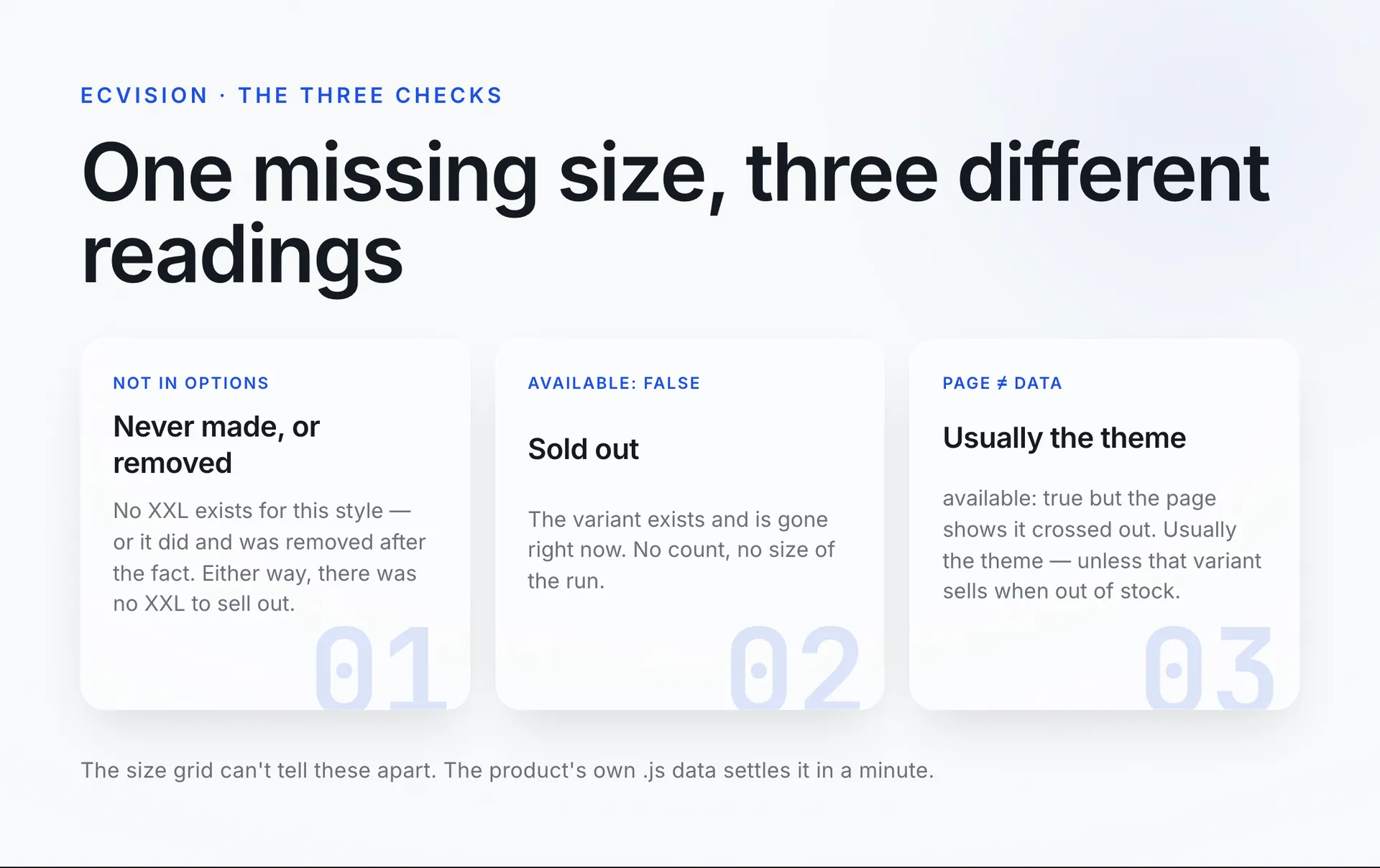
That one page settles all three readings:
- Never made, or deleted since: the size isn't in
options, or the size-and-colour pair has no entry invariants. The data looks the same either way, because a merchant who stops selling a variant can delete it outright (Shopify Help Center). What it can't be is a listed size that sold out. - Sold out: the variant is listed, and
availableisfalse. - Page and data disagree: the variant says
available: truebut the page shows it crossed out, or the reverse. Usually that is the theme, with one exception below.
One caveat on available: true. Shopify lets a merchant select Continue selling when out of stock on a product or variant; in Shopify's words, "if you want to track inventory in Shopify and let customers buy out of stock items, then you can adjust inventory tracking to oversell" (Shopify Help Center). A variant set that way can be out of stock and still buyable. So available: true means the store will take the order, not that units are on the shelf.
What does this look like on one rival's legging?
Say you sell activewear, and a rival's black legging shows XS crossed out, XXL missing, and M available in black but crossed out in navy. On the page, it looks like a sell-through. The product data can tell a different story.
Open the .js version of that product. Suppose options has no XXL at all: the rival either never made it or deleted it, and you can't tell which from here, but either way it isn't a size sitting there sold out. Suppose black XS is listed with available: false: that one really is sold out right now, though you don't know if the run was large or small. And suppose navy M says available: true: the crossed-out square on the page was most likely the theme, unless that variant is set to sell when out of stock.
One sold-out variant, out of three gaps you could have read as demand. That's the difference between "their black legging is flying" and "one size in one colour is out".
What does ecvision show, and what doesn't it?
ecvision, which shows what's already selling in your market (the products, the creative and the ads behind them), flags which of a tracked rival's products are sold out, across the stores you track, so you don't have to open every page to find out. It works per product, not per size or colour. When it marks one, the three checks above are what you run on that page.
On the Products screen, a product gets a Sold out badge only where the storefront itself said the product was unavailable. If a store never published its availability, ecvision doesn't guess it. A filter labelled Stock, with the chips All, In stock and Sold out, narrows the list across the stores you track. The product record ecvision keeps has no size, colour or variant field, so it can't tell you which size went. That's the honest limit, and the reason the hand check still matters. What each plan includes is on the ecvision pricing page.
The one-minute check
Run this on any rival product that looks like it's selling out:
- Is the size in the picker in any colour? If not, open the
.jsdata. Not inoptionsmeans it was never made or has been deleted, not that it sold out. - Is it crossed out? Confirm in the
.jsdata:available: falseis a real sold-out, right now, with no count. - Does it flip between colours in a way that doesn't add up? Trust the
.jsdata over the page. - Watching many rivals? Let a tracker flag the sold-out product, then run these checks on the one page that matters.
Sources
Read on 8 October 2026, rechecked on 19 October 2026.
- Shopify Help Center, Variants: a variant is one specific combination of a product's options, such as a small, blue T-shirt.
- Shopify Help Center, Adding variants: adding an option value creates the matching size variants, so a merchant decides which combinations exist.
- Shopify Help Center, Editing variants for an existing product: a merchant can delete a variant, so a missing size can be one that was removed.
- Shopify Help Center, Selling out of stock products: a variant can be set to keep selling when out of stock.
- Shopify developer docs, Support high-variant products: how themes decide an option value is available, and why large variant counts strain them.
- Shopify developer docs, Product API reference: the
.jsproduct endpoint and itsavailableflag. - Shopify developer docs, Liquid reference: Liquid is Shopify's theme template language.
- Shopify developer changelog, The product variant limit is now 2048 for all merchants: the 15 October 2025 variant-limit change.
- Shopify Community, New 2026 updates/ product variants/ color swatches: a merchant's May 2026 report that sold-out sizes no longer cross out per colour, and a member's explanation.
- Shopify Community, Get sold out Size variant for each Color Variant: a March 2023 merchant who found size stock treated as shared across colours.
- Shopify Community, Size Variant Disappeared When Sold Out: an October 2022 merchant whose sold-out sizes vanished from the picker.